# Johanguse
> Johanguse - Complete documentation with full content
## Full Content
### Johan Guse Portfolio
**URL:** https://johanguse.dev/
[Skip to main content](https://johanguse.dev/#main-content)
# Latest Works
Check out my latest works!
[](https://johanguse.dev/projects/rural-dispatch/)
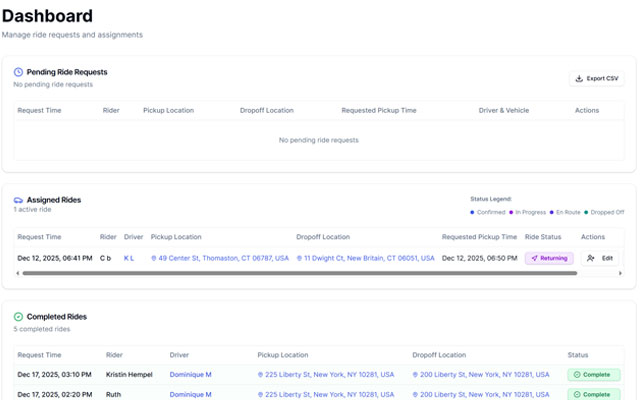
## [Rural Dispatch](https://johanguse.dev/projects/rural-dispatch/)
Date: December 2025 - Present
Skills: React 18, TypeScript, Vite, Fastify, Node.js, PostgreSQL, Prisma, Twilio, Vonage, Tailwind CSS, shadcn/ui, Zod
[Client: SWARM NYC](https://swarmnyc.com/)
[Learn more about Rural Dispatch →](https://johanguse.dev/projects/rural-dispatch/)
[](https://johanguse.dev/projects/bank-statement-converter/)
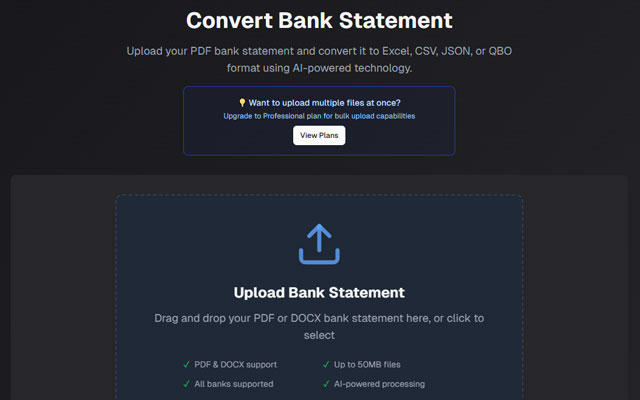
## [Bank Statement Converter](https://johanguse.dev/projects/bank-statement-converter/)
Date: July 2025 - Present
Skills: Next.js 15, React 19, TypeScript, FastAPI, Python, OCR, Cloudflare R2, PostgreSQL, Prisma, Stripe
[Client: Personal Project](https://bankstatementconverterwithai.com/?utm_source=johan-github-readme)
[Learn more about Bank Statement Converter →](https://johanguse.dev/projects/bank-statement-converter/)
[](https://johanguse.dev/projects/llm-generator/)
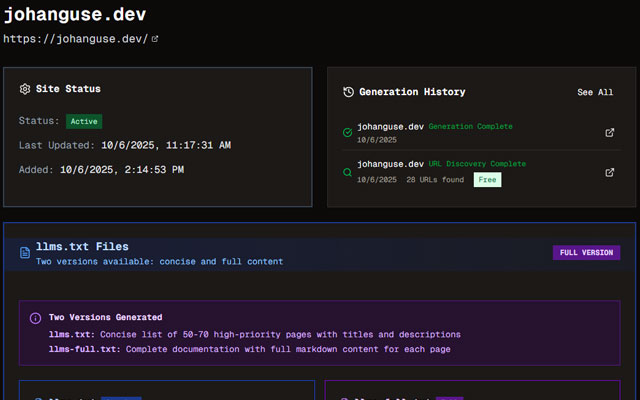
## [LLM Generator](https://johanguse.dev/projects/llm-generator/)
Date: June 2025 - Present
Skills: React 19, TypeScript, Vite, Hono, Cloudflare Workers, D1, Drizzle ORM, Firecrawl, OpenAI, Trigger.dev, Better Auth
[Client: Personal Project](https://llmgenerator.com/?utm_source=johan-github-readme)
[Learn more about LLM Generator →](https://johanguse.dev/projects/llm-generator/)
[](https://johanguse.dev/projects/datatalked/)
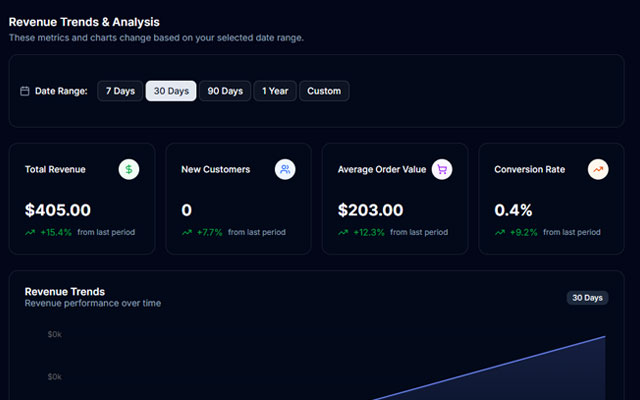
## [DataTalked](https://johanguse.dev/projects/datatalked/)
Date: September 2025 - Present
Skills: React 19, TypeScript, TanStack Router, Convex, Clerk, Stripe Webhooks, OpenAI, Anthropic, RAG, Resend, Recharts, ShadcnUI
[Client: Personal Project](https://datatalked.com/?utm_source=johan-github-readme)
[Learn more about DataTalked →](https://johanguse.dev/projects/datatalked/)
[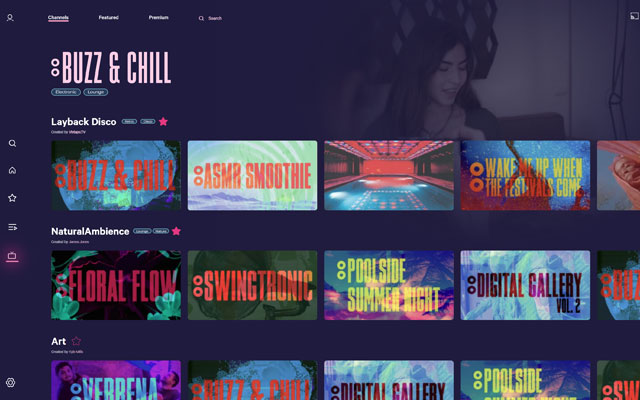](https://johanguse.dev/projects/vixtape/)
## [Vixtape](https://johanguse.dev/projects/vixtape/)
Date: August 2024
Skills: Framer, No-code, Interactive Prototyping, UX/UI Design, MVP Development
[Client: SWARM NYC](https://swarmnyc.com/)
[Learn more about Vixtape →](https://johanguse.dev/projects/vixtape/)
[](https://github.com/johanguse/hanko_hackathon)
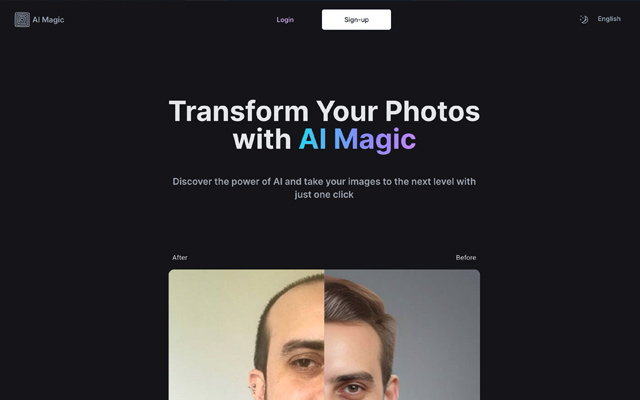
## [Hanko Hackathon](https://github.com/johanguse/hanko_hackathon)
Date: November 2023
Skills: Next.js, TypeScript, Passkey, Multilingual, PostgreSQL, Supabase
[Client: Hanko Hackathon](https://github.com/johanguse/hanko_hackathon)
[Visit Hanko Hackathon (opens in a new tab) →](https://github.com/johanguse/hanko_hackathon)
[Check out all projects →](https://johanguse.dev/projects/)
## Latest from blog
My personal portfolio website and blog. A developer from Brazil.
- Published on
December 27, 2025
## [Google Search Console Regex Filtering: Find AI-Generated Queries](https://johanguse.dev/blog/google-search-console-regex-filtering/)
[seo](https://johanguse.dev/tags/seo/) [google](https://johanguse.dev/tags/google/) [analytics](https://johanguse.dev/tags/analytics/)
Learn how to use regex patterns in Google Search Console to identify queries that likely came from AI tools like ChatGPT, Perplexity, or Google AI Overviews.
[Read more: Google Search Console Regex Filtering: Find AI-Generated Queries →](https://johanguse.dev/blog/google-search-console-regex-filtering/)
- Published on
March 1, 2025
## [CSS nesting: What is it and how to use it?](https://johanguse.dev/blog/css-nesting/)
[css](https://johanguse.dev/tags/css/) [frontend](https://johanguse.dev/tags/frontend/)
CSS nesting is a new feature that allows you to nest one style rule inside another (like SASS), with the selector of the child rule relative to the selector of the parent rule.
[Read more: CSS nesting: What is it and how to use it? →](https://johanguse.dev/blog/css-nesting/)
- Published on
May 27, 2024
## [How to downgrade VSCode extension](https://johanguse.dev/blog/downgrading-vscode-extension/)
[ide](https://johanguse.dev/tags/ide/) [tutorial](https://johanguse.dev/tags/tutorial/)
Learn how to downgrade a VSCode extension to an older version easily. This guide provides two methods to revert to a previous version.
[Read more: How to downgrade VSCode extension →](https://johanguse.dev/blog/downgrading-vscode-extension/)
- Published on
April 8, 2024
## [Using React useState to store multiple values](https://johanguse.dev/blog/react-usestate-store-multiple-values/)
[react](https://johanguse.dev/tags/react/) [frontend](https://johanguse.dev/tags/frontend/)
Learn how we can store multiple values in single state using useState hook in functional component.
[Read more: Using React useState to store multiple values →](https://johanguse.dev/blog/react-usestate-store-multiple-values/)
- Published on
January 1, 2024
## [Using External Images on Cloudflare Workers & Pages with Next.js](https://johanguse.dev/blog/how-to-use-external-images-on-cloudflare-with-nextjs/)
[Next.js](https://johanguse.dev/tags/next.js/) [Cloudflare](https://johanguse.dev/tags/cloudflare/)
Working with external images on Cloudflare Workers & Pages using a custo loader from NextJS
[Read more: Using External Images on Cloudflare Workers & Pages with Next.js →](https://johanguse.dev/blog/how-to-use-external-images-on-cloudflare-with-nextjs/)
[All Posts →](https://johanguse.dev/blog/)
---
### Johan Guse Profile
**URL:** https://johanguse.dev/about/
[Skip to main content](https://johanguse.dev/about/#main-content)
# About

## Johan Guse
Software Engineer
Currently working at Radix - radixeng.com
[mail](mailto:johanguse@gmail.com) [github](https://github.com/johanguse) [linkedin](https://www.linkedin.com/in/johanguse) [twitter](https://twitter.com/johanguse)
Developing web solutions since 2006.
Highly skilled and dedicated full-stack developer with over ten years of industry experience, specializing in AI-powered applications, real-time systems, and modern cloud-native architectures. Currently pursuing Applied Artificial Intelligence studies while building production SaaS platforms that leverage cutting-edge technologies, including LLMs, real-time WebSocket systems, and advanced data processing—committed to promoting accessibility and ensuring equal opportunities for all individuals to navigate the web. I firmly believe in the inclusive nature of the Internet and continuously seek ways to enhance both the accessibility and intelligence of my applications. Passionate about combining traditional web development expertise with emerging AI technologies to create innovative, user-friendly experiences that solve real-world problems.
Overall, I am a highly skilled software engineer with a passion for AI and web accessibility a commitment to delivering high-quality solutions.
---
### Custom macOS Finder Menu
**URL:** https://johanguse.dev/blog/create-custom-right-click-context-menu-item-in-macos-finder/
[Skip to main content](https://johanguse.dev/blog/create-custom-right-click-context-menu-item-in-macos-finder/#main-content)
Author
- NameJohan GuseTwitter[@johanguse](https://twitter.com/johanguse)
* * *
**Enhancing macOS Finder with a Context Menu, Similar to Windows OS**
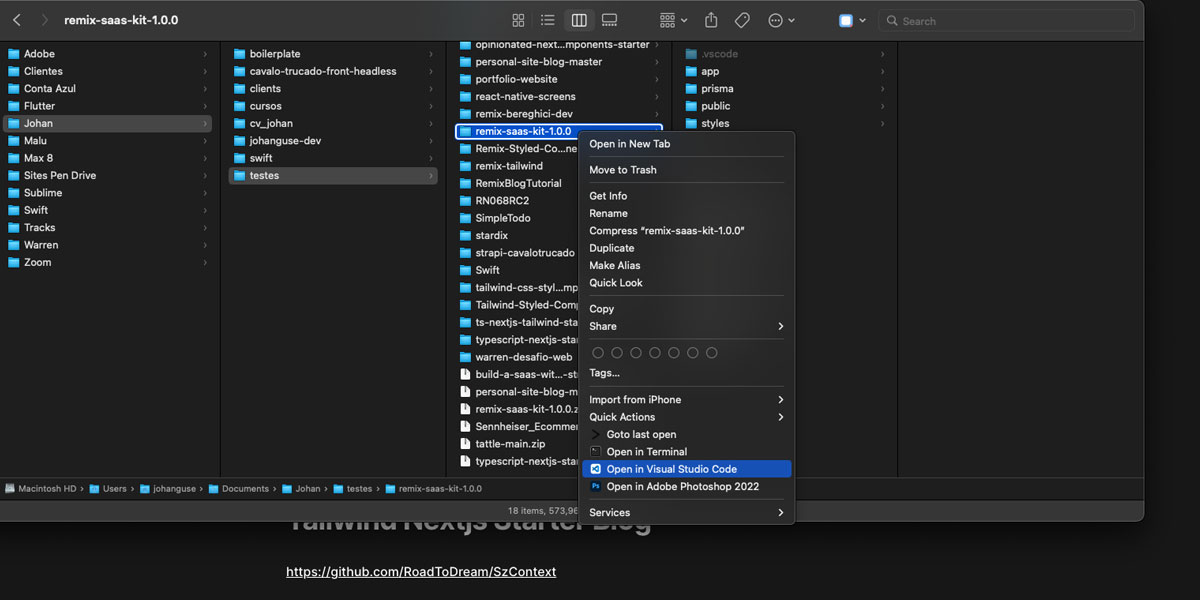
If you’ve switched from a Windows PC to a macOS computer, one of the features you might miss is the convenient context menu that pops up when you right-click on an item in Windows. While macOS Finder has its own context menu, the customization options might seem limited in comparison. However, there’s no need to fret! There are several methods available to enrich the macOS Finder’s context menu, bringing it closer to what you might be used to in Windows.
In my journey to replicate the Windows context menu on macOS, I stumbled upon various solutions ranging from complicated scripts to simple apps. Of these, the most user-friendly and straightforward tool I found is an application called **SzContext**.
**What is SzContext?**
[SzContext](https://github.com/RoadToDream/SzContext) is an open-source application hosted on GitHub that allows users to seamlessly add custom links or applications to the macOS Finder’s context menu. What’s more appealing about SzContext is its simplicity and ease of use. You don’t need to have a deep understanding of macOS internals or go through multiple confusing steps.
**How to Set Up SzContext:**
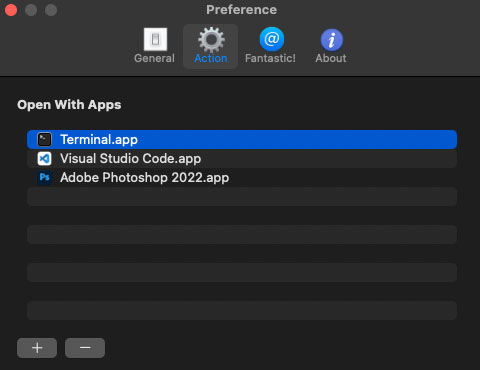
1. **Download and Install**: First, head over to the [SzContext GitHub page](https://github.com/RoadToDream/SzContext) and download the latest release. Once downloaded, follow the standard macOS application installation process.
2. **Configuration**: Launch the SzContext application. The interface is quite intuitive, and with a few clicks, you can select the applications or shortcuts you want to add to the context menu.
3. **Enjoy the Enhanced Context Menu**: Once your desired programs and links are set, simply right-click on any item in macOS Finder. You’ll now see your added applications in the context menu, ready to be used.
**Benefits of Using SzContext**:
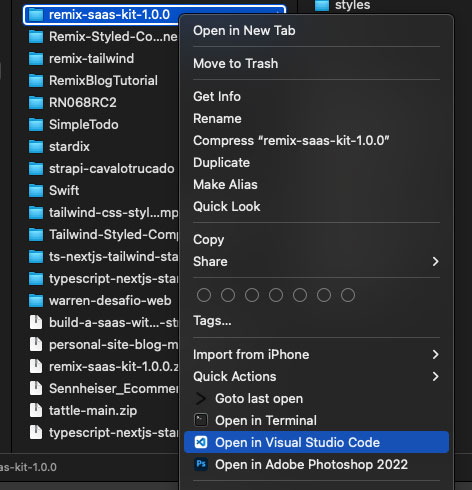
- **Tailored Experience**: Customize your context menu to have your most-used applications and tools easily accessible.
- **Saves Time**: Instead of navigating through your applications folder or searching for an app, you can launch it directly from the context menu.
- **Streamlined Workflow**: By having frequently used tools right at your fingertips, you can improve your productivity and make tasks more efficient.
In conclusion, while macOS Finder has its unique benefits, it doesn’t mean you can’t incorporate features you’ve loved from other operating systems. With SzContext, you’re just a few clicks away from a more customized and efficient macOS Finder experience. Give it a try and enjoy the best of both worlds!
---
### Johan Guse Blog Posts
**URL:** https://johanguse.dev/blog/
[Skip to main content](https://johanguse.dev/blog/#main-content)
# All Posts
- Published on
December 27, 2025
## [Google Search Console Regex Filtering: Find AI-Generated Queries](https://johanguse.dev/blog/google-search-console-regex-filtering/)
[seo](https://johanguse.dev/tags/seo/) [google](https://johanguse.dev/tags/google/) [analytics](https://johanguse.dev/tags/analytics/)
Learn how to use regex patterns in Google Search Console to identify queries that likely came from AI tools like ChatGPT, Perplexity, or Google AI Overviews.
- Published on
March 1, 2025
## [CSS nesting: What is it and how to use it?](https://johanguse.dev/blog/css-nesting/)
[css](https://johanguse.dev/tags/css/) [frontend](https://johanguse.dev/tags/frontend/)
CSS nesting is a new feature that allows you to nest one style rule inside another (like SASS), with the selector of the child rule relative to the selector of the parent rule.
- Published on
May 27, 2024
## [How to downgrade VSCode extension](https://johanguse.dev/blog/downgrading-vscode-extension/)
[ide](https://johanguse.dev/tags/ide/) [tutorial](https://johanguse.dev/tags/tutorial/)
Learn how to downgrade a VSCode extension to an older version easily. This guide provides two methods to revert to a previous version.
- Published on
April 8, 2024
## [Using React useState to store multiple values](https://johanguse.dev/blog/react-usestate-store-multiple-values/)
[react](https://johanguse.dev/tags/react/) [frontend](https://johanguse.dev/tags/frontend/)
Learn how we can store multiple values in single state using useState hook in functional component.
- Published on
January 1, 2024
## [Using External Images on Cloudflare Workers & Pages with Next.js](https://johanguse.dev/blog/how-to-use-external-images-on-cloudflare-with-nextjs/)
[Next.js](https://johanguse.dev/tags/next.js/) [Cloudflare](https://johanguse.dev/tags/cloudflare/)
Working with external images on Cloudflare Workers & Pages using a custo loader from NextJS
- Published on
October 27, 2023
## [Hanko Hackathon 2023](https://johanguse.dev/blog/hanko-auth-hackathon/)
[hackathon](https://johanguse.dev/tags/hackathon/)
Unpacking NextJS 14, playing with cool authentication, and making setup a breeze! Hanko Hackathon 2023
- Published on
February 4, 2023
## [WCAG 2.2 - Success Criteria 4.1.1 Parsing is No Longer Necessary (Obsolete)](https://johanguse.dev/blog/success-criteria-4-1-1-parsing-is-no-longer-necessary/)
[a11y](https://johanguse.dev/tags/a11y/) [news](https://johanguse.dev/tags/news/)
WCAG 2.2, the latest version of the Web Content Accessibility Guidelines, is set to be completed and published in April 2023. The new version of the guidelines will bring changes and improvements to the standards for web accessibility, including the removal of Success Criteria 4.1.1 Parsing.
- Published on
May 5, 2022
## [How do you add options to the Right Click Context Menu on MacOS Finder](https://johanguse.dev/blog/create-custom-right-click-context-menu-item-in-macos-finder/)
[macos](https://johanguse.dev/tags/macos/) [guide](https://johanguse.dev/tags/guide/)
Add context menu to macOS Finder (like Windows OS)
---
### Native CSS Nesting
**URL:** https://johanguse.dev/blog/css-nesting/
[Skip to main content](https://johanguse.dev/blog/css-nesting/#main-content)
Author
- NameJohan GuseTwitter[@johanguse](https://twitter.com/johanguse)
Okay, let’s talk about CSS nesting - this amazing feature that just dropped into the CSS world and is blowing my mind! Remember all those years we spent using Sass or Less just to get that sweet, sweet nesting functionality? Well, guess what? Now it’s native!
If you’re like me, you’ve probably written thousands of lines of CSS that look something like this:
```
.card { background: white; }
.card .title { font-weight: bold; }
.card .body { padding: 15px; }
.card .footer { border-top: 1px solid #eee; }
.card .footer .button { padding: 8px 16px; }
.card .footer .button:hover { background: #f5f5f5; }
```
Man, that’s a lot of repetitive `.card` selectors, right? Talk about violating DRY principles! And don’t even get me started on how this messes with the natural DOM structure in your stylesheets.
## What is CSS nesting, really?
CSS nesting lets you write styles that follow the same visual hierarchy as your HTML structure. It’s that simple, and that revolutionary!
For years, CSS preprocessors like Sass and Less have been our saviors here. But now? We can ditch the middleman and go straight native. The syntax is super similar to what you might be used to in Sass, with a couple of twists.
In native CSS nesting, you’ve got two main approaches: the ampersand (`&`) syntax or the `@nest` rule. Let me show you how ridiculous of an improvement this is:
```
/* Before: The old, repetitive way */
.card { background: white; }
.card .title { font-weight: bold; }
.card .body { padding: 15px; }
/* After: With native CSS nesting 🤩 */
.card {
background: white;
.title {
font-weight: bold;
}
.body {
padding: 15px;
}
&:hover {
box-shadow: 0 2px 8px rgba(0,0,0,0.1);
}
}
```
Isn’t that so much cleaner? I’m literally obsessed with how readable this makes my stylesheets.
## Real-world example that’ll make you smile
Let me show you a practical example I worked on recently. I had this navbar component that was driving me nuts:
```
/* The old painful way */
.navbar { display: flex; }
.navbar .brand { font-weight: bold; }
.navbar .links { margin-left: auto; }
.navbar .links .link { padding: 0 15px; }
.navbar .links .link:hover { color: blue; }
.navbar .links .link.active { font-weight: bold; }
.navbar .menu-button { display: none; }
@media (max-width: 768px) {
.navbar .links { display: none; }
.navbar .menu-button { display: block; }
}
```
With CSS nesting, this transforms into:
```
.navbar {
display: flex;
.brand {
font-weight: bold;
}
.links {
margin-left: auto;
.link {
padding: 0 15px;
&:hover {
color: blue;
}
&.active {
font-weight: bold;
}
}
@media (max-width: 768px) {
display: none;
}
}
.menu-button {
display: none;
@media (max-width: 768px) {
display: block;
}
}
}
```
That’s the power of nesting! You can see the structure at a glance, media queries are exactly where they should be, and the relationship between elements is crystal clear.
## The two ways to nest (pick your weapon)
### The & syntax (my personal fave)
The ampersand symbol is your friend here. It represents the parent selector and is super useful for pseudo-classes, pseudo-elements, and combinators:
```
.button {
background: blue;
color: white;
/* Pseudo-class */
&:hover {
background: darkblue;
}
/* Direct descendant */
& > span {
font-weight: bold;
}
/* Multiple selectors sharing properties */
&.primary, &.secondary {
border-radius: 4px;
}
}
```
### The @nest rule (the new kid on the block)
The `@nest` rule is an alternative that gives you a bit more explicit control:
```
.card {
background: white;
@nest & .title {
font-weight: bold;
}
@nest &:hover, &:focus {
box-shadow: 0 2px 8px rgba(0,0,0,0.1);
}
}
```
Honestly, I tend to stick with the `&` syntax for most cases because it’s cleaner, but `@nest` can be useful in complex selectors or when you want to be super explicit.
## Browser Support - Can I use it yet?
So here’s the million-dollar question: can you actually use this amazing feature in production? The answer is: it depends!
As of mid-2023, CSS nesting has gained pretty decent browser support:
- Chrome: Fully supported since version 112
- Firefox: Supported since version 117
- Safari: Supported since version 16.4
- Edge: Supported since version 112
You can always check the latest support at [caniuse.com/css-nesting](https://caniuse.com/css-nesting).
If you need to support older browsers, don’t worry! You’ve got options:
1. Use PostCSS with the [postcss-nesting](https://github.com/csstools/postcss-plugins/tree/main/plugins/postcss-nesting) plugin
2. Stick with Sass/Less and compile down to regular CSS
3. Use progressive enhancement - browsers that don’t support nesting will just ignore those rules
## Why I’m obsessed with CSS nesting
Let me count the ways:
1. **Mental model alignment**: Your CSS structure now matches your HTML structure. No more mental gymnastics!
2. **Reduced repetition**: Say goodbye to repeating parent selectors over and over. My RSI thanks me.
3. **Scope containment**: Styles for related elements stay grouped together. No more hunting through your stylesheet!
4. **Improved maintainability**: When you need to change a component, all its styles are in one spot.
5. **Better media queries**: Put your responsive styles right next to the elements they modify.
But with great power comes great responsibility! Don’t go crazy with nesting depth - stick to 3-4 levels max to keep things manageable.
## Gotchas to watch out for
Nothing’s perfect, and there are a few things to be aware of:
1. **Specificity creep**: Deep nesting can lead to high specificity, making it harder to override styles later. Keep it shallow!
2. **Performance**: While nesting itself doesn’t impact runtime performance, it might lead to more complex selectors if you go overboard.
3. **Different syntax from Sass**: If you’re a Sass veteran, be aware there are some syntax differences, especially with the requirement for `&` in many cases.
4. **Transition pains**: If you’re working on a team, ensure everyone understands the new syntax before fully adopting it.
## A real project showcasing CSS nesting
If you’re curious about seeing CSS nesting in action, I’ve put together a small demo project that showcases various nesting techniques and patterns: open the [CSS nesting demo on CodePen](https://codepen.io/johanguse/pen/abRVjQZ).
This demo includes common UI components like cards, forms, and navigation, all styled using native CSS nesting. Feel free to fork it and experiment!
## Conclusion
CSS nesting is one of those features that makes you wonder, “Why did this take so long?” It’s intuitive, powerful, and helps make your stylesheets reflect the structure of your markup.
If you’ve been holding off on learning preprocessors just for nesting, guess what? Your patience has paid off! And if you’ve been a Sass/Less user for years, you can now enjoy one of your favorite features natively.
So go forth and nest! Your CSS files will thank you, your teammates will thank you, and most importantly, your future self will thank you when you come back to maintain that code six months from now.
Happy styling, and until next time, keep your CSS clean and your nesting sensible!
---
### Downgrade VSCode Extensions
**URL:** https://johanguse.dev/blog/downgrading-vscode-extension/
[Skip to main content](https://johanguse.dev/blog/downgrading-vscode-extension/#main-content)
Author
- NameJohan GuseTwitter[@johanguse](https://twitter.com/johanguse)
Today, I encountered an issue with the popular AI extension, Codeium. Fortunately, the team quickly resolved the problem, but yesterday I had to rollback to an older version to fix the issue on my side. If you need to downgrade any extension to an older version, here are two ways to downgrade a VSCode extension:
## Method 1: Using VSCode (the easiest way)
1. Open VSCode and click on the `Extensions` tab, or press `CTRL+SHIFT+X` (Windows) or `CMD+SHIFT+X` (Mac) to search for extensions.
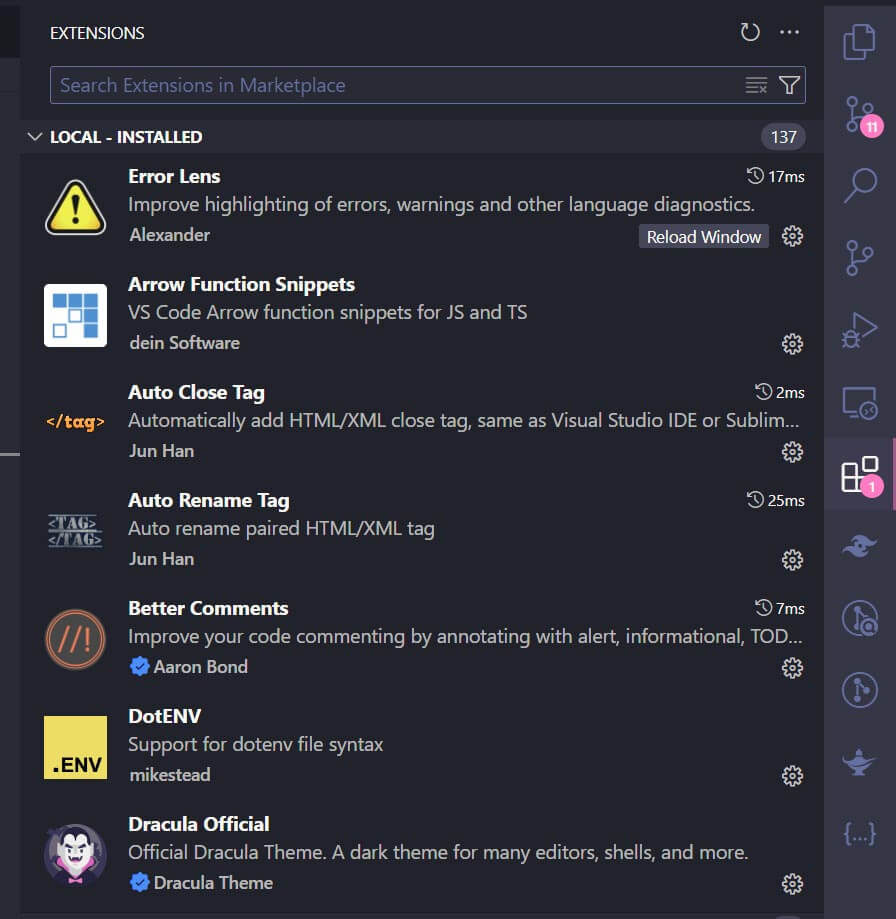
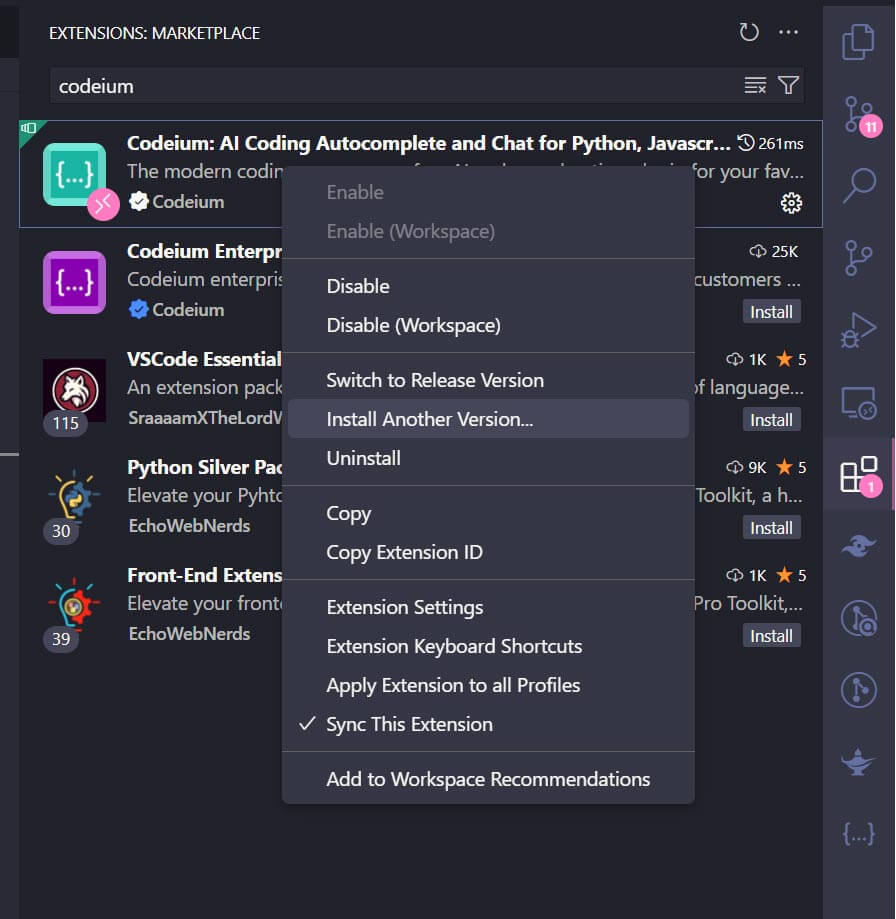
2. Type the extension name, right-click on the plugin name, and select `Install Another Version`.
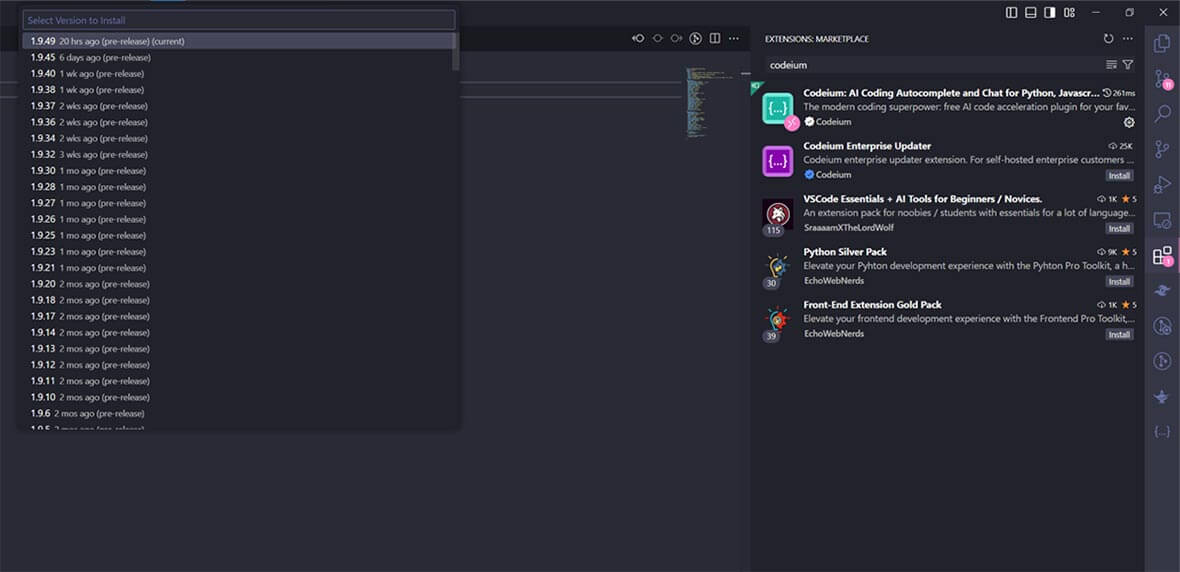
3. A list of versions will appear. Select the desired version and click on it to `Install`.
## Method 2: Using a .vsix file from the VSCode Marketplace
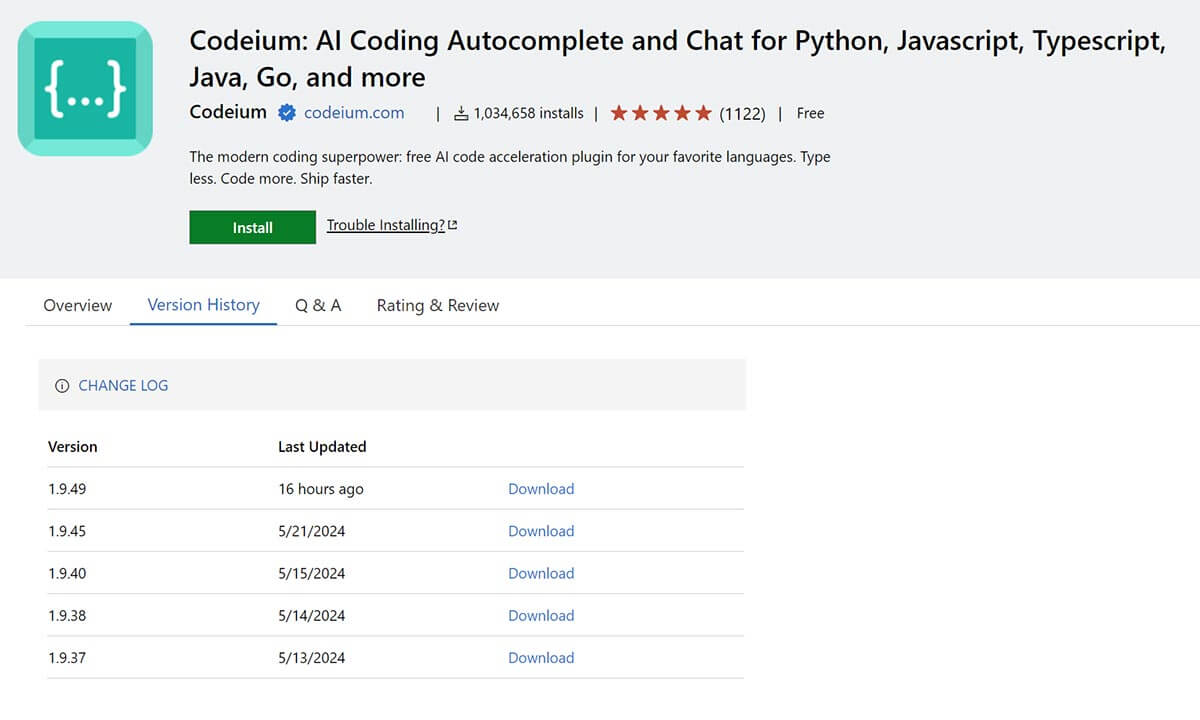
1. Visit the extension’s page on the [VSCode Marketplace](https://marketplace.visualstudio.com/items?itemName=codeium.codeium), navigate to the `Version History` section, and download the `.vsix` file to your computer.
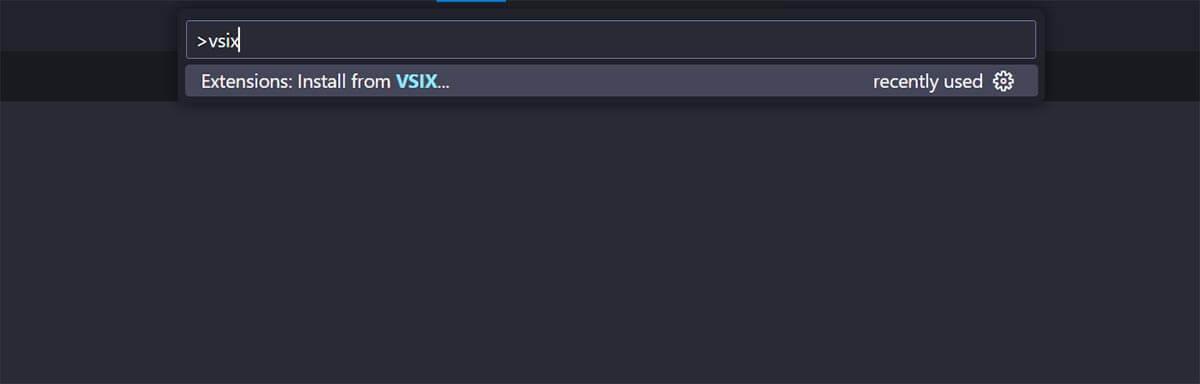
2. After downloading the `.vsix` file, open VSCode and press `CTRL+SHIFT+P` (Windows) or `CMD+SHIFT+P` (Mac). In the command line, type `vsix` and select the option to install from the downloaded file.
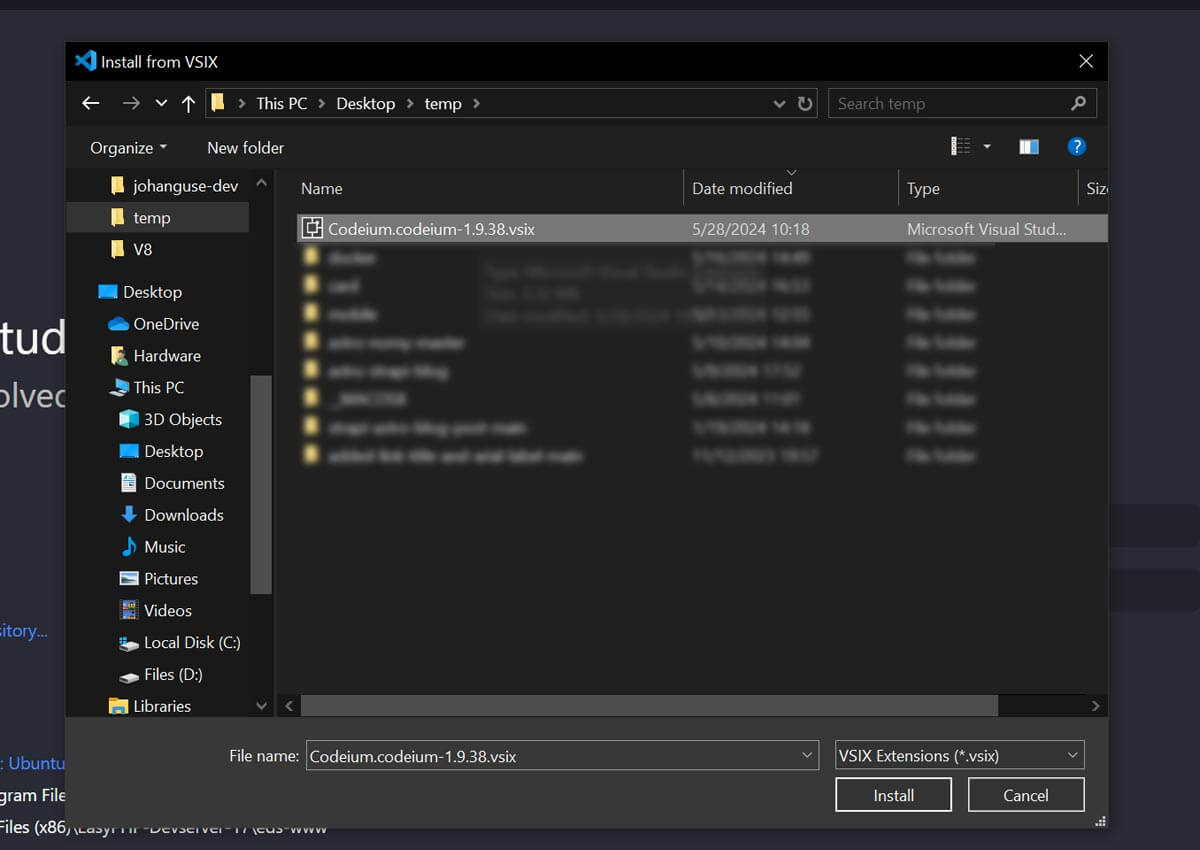
3. Install the `.vsix` file.
4. Restart VSCode: Open the Command Palette with `CTRL+ALT+R` (Windows) or `CMD+ALT+R` (Mac), type `Reload Window`, and select `Developer: Reload Window`.
_Voilà!_ Downgrading a VSCode extension is pretty straightforward with these methods. I hope this helps you out next time you run into any issues or needs to downgrade an extension.
---
### NextJS 14 Hanko Auth
**URL:** https://johanguse.dev/blog/hanko-auth-hackathon/
[Skip to main content](https://johanguse.dev/blog/hanko-auth-hackathon/#main-content)
Author
- NameJohan GuseTwitter[@johanguse](https://twitter.com/johanguse)
Upon know about Hanko’s Hackathon, I was quick to conceptualize and implement a project using NextJS.
As it happens, Vercel recently released NextJS 14, and I saw it fitting to base this guide on a new installation of this version. For those interested in viewing the project I submitted for the Hackathon, you can open the [live demo on Vercel](https://hanko-hackathon.vercel.app/) and browse the [Hanko hackathon source on GitHub](https://github.com/johanguse/hanko_hackathon).
To proceed with this tutorial, it’s essential to have NextJS 14 installed. If you haven’t done so, you can refer to the [official documentation](https://nextjs.org/docs/getting-started/installation). It’s worth noting that I utilized the APP Directory structure coupled with TypeScript.
Once you have NextJS ready, the next step is to integrate Hanko. This integration with Next is achieved using “elements”. Following the [official Hanko documentation](https://docs.hanko.io/quickstarts/fullstack/next), install the package with your preferred client—for example:
```
bun add @teamhanko/hanko-elements
# or: pnpm add / npm install / yarn add @teamhanko/hanko-elements
```
For Hanko to function, you must have an account and obtain the API URL:
1. Sign up or log in to your Hanko account.
2. Navigate to your project, or create one if you haven’t already.
3. Retrieve the API URL from the main dashboard.
After obtaining the API URL, make sure to add it to your `.env` file. If you’re deploying your site on Vercel, remember to include this in the Vercel dashboard as well.
With the setup complete, you’re all set to implement the authentication process. This includes constructing the login/register page, a private dashboard, and a user profile page. To assist you further, I’ve prepared a boilerplate project with NextJS 14, incorporating App Router, TypeScript, and TailwindCSS. Clone or fork the [Next.js 14 + Hanko boilerplate on GitHub](https://github.com/johanguse/nextjs14-hanko-auth).
When you explore my boilerplate, you’ll spot an auth folder within the components directory. Let’s break down the purpose of each item within:
```
/
├── public/
├── src/
│ ├── app/
├── components/
│ ├── auth
│ │ └── ButtonLogout.tsx
│ │ └── ContentDashboard.tsx
│ │ └── HankoAuth.tsx
│ │ └── HankoProfile.tsx
└── middleware.ts
```
``: Simply put, this is the button that allows logged-in users to sign out of your
app.
``: A versatile component for protecting your pages from unauthorized access. While this serves as a layer of security, the preferred method to shield pages is using middleware.
``: Drop this component wherever you need login or registration functionality. It’s a
comprehensive solution for both creating an account and signing into your app.
``: This is a profile editor component. Integrate it into any page where you want
users to have options to tweak their profiles.
`function middleware`: Think of it as the guardian of your web app, setting up global protection for your pages. So instead of manually securing each page, the middleware’s got your back, making sure everything’s locked down tight
Wrapping up, Hanko’s pretty much a game-changer for web app auth. Simple, secure, and no fuss. If you’re diving into NextJS or any modern web project, give it a whirl! Would love to hear how it goes for you. Keep coding, stay curious, and catch you in the next post! 🚀✌️
---
### GSC Regex AI Queries
**URL:** https://johanguse.dev/blog/google-search-console-regex-filtering/
[Skip to main content](https://johanguse.dev/blog/google-search-console-regex-filtering/#main-content)
Author
- NameJohan GuseTwitter[@johanguse](https://twitter.com/johanguse)
Ever wondered if those long, conversational search queries hitting your site are coming from AI tools like ChatGPT, Perplexity, or Google AI Overviews? You’re not alone! With the rise of AI-powered search, understanding what kind of queries are driving traffic to your site has become more important than ever.
The good news? Google Search Console has a powerful feature that lets you filter queries using regex patterns. And the best part? You don’t need any coding experience to use it!
## Why This Matters
AI-generated queries tend to be:
- **Longer and more conversational** (think “how do I…” instead of “how to”)
- **Question-heavy** (lots of “what”, “why”, “how” queries)
- **Natural language focused** (full sentences rather than keywords)
By identifying these patterns, you can:
- Understand how AI is changing search behavior
- Optimize content for conversational queries
- Spot opportunities to create FAQ-style content
- Track the impact of AI on your search traffic
## The 101 Guide: How to Use Regex in Google Search Console
Here’s the step-by-step process (seriously, no code experience required):
### Step 1: Log into Google Search Console
Navigate to your property in [Google Search Console](https://search.google.com/search-console).
### Step 2: Go to Performance > Search results
Click on “Performance” in the left sidebar, then make sure you’re viewing the “Search results” tab.
### Step 3: Apply a Regex Filter
On the top filter list, click the ”+ Add Filter” button → Select “Query” → Choose “Custom (regex)”.
### Step 4: Enter Your Regex Pattern
Paste your regex pattern into the filter field. That’s it!
## Regex Patterns You Can Use Right Now
I’ve compiled some powerful regex patterns that will help you identify different types of queries. Let me break them down:
### Pattern 1: Finding Long Queries (7+ Words)
This pattern catches searches that are at least seven words long - a common characteristic of AI-generated queries:
```
(\b\w+\b\s){7,}
```
**What it does:** Matches any query with 7 or more words. The `{7,}` means “at least 7 occurrences” of a word followed by a space.
Feel free to change the number of words to your desired length.
**Example matches:**
- “how do I create a custom right click context menu item in macos finder”
- “what is the difference between useState and useReducer in React”
### Pattern 2: Long Natural Language Searches
This one targets those really long, natural-sounding queries:
```
^\S+(?:\s+\S+){9,}.*
```
**What it does:** Matches queries with at least 10 words (the first word plus 9 more). The `\S+` matches non-whitespace characters (words), and `{9,}` means 9 or more additional words.
**Example matches:**
- “can you explain how to use external images on cloudflare with nextjs and what are the best practices”
- “what are the differences between css nesting and sass nesting and when should I use each”
### Pattern 3: Question Queries
This comprehensive pattern catches almost every type of question:
```
^(are|arent|aren't|can|cannot|cant|can't|could|couldnt|couldn't|did|did not|didnt|didn't|do|does|doesnt|doesn't|how|if|is|should|shouldnt|shouldn't|was|were|werent|weren't|what|when|where|which|who|whom|why|will|wont|won't|would|wouldnt|wouldn't)
```
**What it does:** Matches queries that start with common question words. The `^` means “start of string”, so it only matches questions at the beginning.
**Example matches:**
- “how do I use React useState”
- “what is CSS nesting”
- “can you explain Next.js image optimization”
### Pattern 4: Comprehensive AI Query Pattern (The Big One!)
This is the most comprehensive pattern - it catches classic question words, implicit questions, comparison queries, and more:
```
(?i)^(how|what|why|when|where|which|who|whom|whose|how many|how much|can|may|might|must|should|could|would|do|does|did|have|has|had|am|are|is|was|were|will|difference|compare|comparison|guide|how[-\s]?to|definition|explain|show|list|recipe|is there|are there|what are|what is|how does)\b|\b(vs\.?|versus|or)\b
```
**What it does:** This pattern matches:
- **Classic W-questions:** “how”, “what”, “why”, “when”, “where”, “which”, “who”, “whom”, “whose”
- **Implicit questions & commands:** “guide”, “definition”, “show me”, “explain”
- **Comparison queries:** “vs”, “versus”, “or”
- **Confirmation & possibility questions:** “can”, “is”, “does”, “are there”
- **Question phrases:** “how to”, “what is”, “how does”, “is there”
The `(?i)` at the beginning makes it case-insensitive, so it matches “How” and “how” equally.
**Example matches:**
- “how to use regex in google search console”
- “what is the difference between React and Vue”
- “explain CSS nesting”
- “React vs Vue comparison”
- “guide to Next.js deployment”
## Real-World Use Cases
Here are some practical ways to use these patterns:
### Use Case 1: Content Strategy
Filter for question queries to identify topics people are asking about. Create FAQ pages or expand existing content to answer these questions directly.
### Use Case 2: AI Impact Analysis
Use the long query patterns to see what percentage of your traffic comes from AI-generated queries. Track this over time to understand how AI is changing search behavior.
### Use Case 3: Keyword Research
Long, natural language queries often reveal new keyword opportunities you might not have considered. These can inform your content creation strategy.
### Use Case 4: Content Optimization
If you see many comparison queries (“vs”, “versus”), consider creating comparison content. If you see lots of “how to” queries, create more tutorial-style content.
## Tips for Using Regex Filters
1. **Combine with Date Ranges:** Use these patterns with specific date ranges to see trends over time.
2. **Export Your Results:** Once filtered, export the data to analyze it further in Excel or Google Sheets.
3. **Test Multiple Patterns:** Try different patterns to see which ones reveal the most interesting insights for your specific site.
4. **Save Your Filters:** Google Search Console lets you save filter combinations, so you can quickly access your favorite patterns.
5. **Start Simple:** Begin with the simpler patterns (like the 7+ words pattern) before diving into the more complex ones.
## Common Regex Gotchas
- **Case Sensitivity:** Most patterns are case-sensitive by default. Use `(?i)` at the start to make them case-insensitive.
- **Special Characters:** Some characters have special meaning in regex (like `.`, `*`, `+`). If you need to match them literally, escape them with a backslash (`\.`).
- **Anchors Matter:**`^` means “start of string” and `$` means “end of string”. Use them when you want to match the entire query.
## Further Reading
If you want to dive deeper into regex patterns for Google Search Console, I highly recommend checking out [Aubrey Yung’s comprehensive guide](https://aubreyyung.com/google-search-console-regex/). It’s packed with even more patterns and insights.
## Conclusion
Regex filtering in Google Search Console is a powerful tool that doesn’t require any coding knowledge to use effectively. By identifying AI-generated queries and understanding how search behavior is changing, you can make more informed decisions about your content strategy.
Start with the simple patterns I’ve shared here, experiment with different combinations, and see what insights you can uncover about your search traffic. You might be surprised by what you find!
Have you tried using regex filters in Google Search Console? What patterns have you found most useful? Let me know - I’d love to hear about your discoveries!
---
### Cloudflare Next.js Image Fix
**URL:** https://johanguse.dev/blog/how-to-use-external-images-on-cloudflare-with-nextjs/
[Skip to main content](https://johanguse.dev/blog/how-to-use-external-images-on-cloudflare-with-nextjs/#main-content)
Author
- NameJohan GuseTwitter[@johanguse](https://twitter.com/johanguse)
* * *
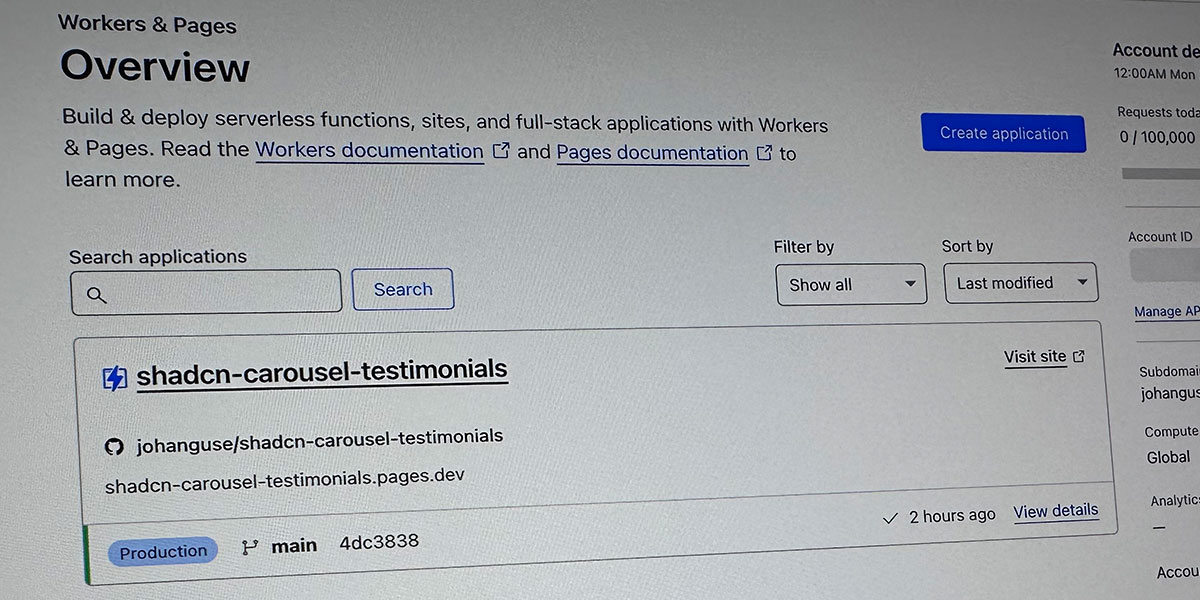
Today, I decided to deploy one of my testing applications in Next.js to Cloudflare Workers & Pages. The deployment process is similar to Vercel, where I used the dashboard with the option `Next.js (Static HTML Export)` and setup `output: 'export'` enabled in my `next.config`. Everything worked smoothly during deployment until I opened the final version. To my surprise, the external images, in this case, images from the [https://pravatar.cc/](https://pravatar.cc/), were not working as expected.
After some research on the web, I couldn’t find a quick answer as I expected. So, I decided to write this short tip to help other developers who might be struggling with the same problem.
This project also serves as a small experiment, involving the recreation of a testimonial using the [new carousel component](https://x.com/shadcn/status/1738283281424982488?s=20). Browse the full source in the [shadcn carousel testimonials repo on GitHub](https://github.com/johanguse/shadcn-carousel-testimonials). I’ll delve into how to make external images work seamlessly on Cloudflare Pages. If you have any further questions or need assistance, feel free to reach out to me on [Twitter](https://twitter.com/johanguse).
To fix this issue, we will follow these three steps:
1. Change `next.config`
2. Create a custom image loader to integrate with Cloudflare
3. Redeploy the project.
### 1\. `next.config.js`
In the `next.config.js`, make sure that `output: 'export'` is set correctly. This is related to Cloudflare deployment. In my case, I used static deployment (`Next.js (Static HTML Export)`). In the images part, ensure that `remotePatterns` are correctly set according to your external images domain property setup. See the official docs for [Next.js Image `remotePatterns`](https://nextjs.org/docs/pages/api-reference/components/image#remotepatterns).
### 2\. Custom Image Loader
In my case, I created a custom image loader in the `next.config.js` file to use a cloud provider to optimize images instead of using the Next.js built-in Image Optimization API.
`next.config.js`:
```
const nextConfig = {
output: 'export',
images: {
loader: 'custom',
loaderFile: './imageLoader.js',
remotePatterns: [\
{\
protocol: 'https',\
hostname: 'i.pravatar.cc',\
},\
],
},
}
module.exports = nextConfig
```
`imageLoader.js`
```
interface ImageLoaderParams {
src: string;
width: number;
quality?: number;
}
export const imageLoader = ({ src, width, quality = 75 }: ImageLoaderParams): string =>
`${src}?w=${width}&q=${quality}`
```
#### Using the Custom Image Loader
Import **imageLoader** from your file and set the Image/next component on your page.
```
'use client'
import Image from 'next/image'
import { imageLoader } from '@/lib/imageLoader'
```
By following these steps, you can commit the modifications to your repository to trigger a new deployment on the Cloudflare dashboard.
#### My before and after
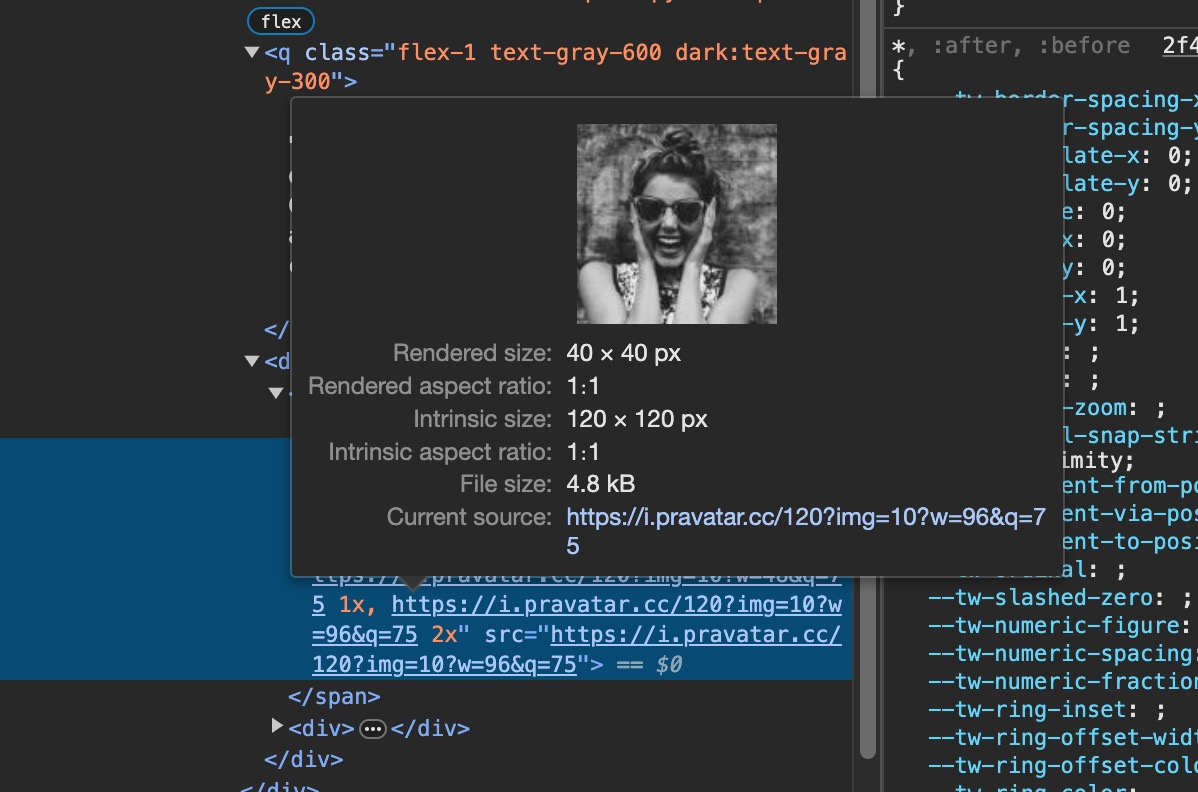
Before: [https://a18b9eba.shadcn-carousel-testimonials.pages.dev/](https://a18b9eba.shadcn-carousel-testimonials.pages.dev/)
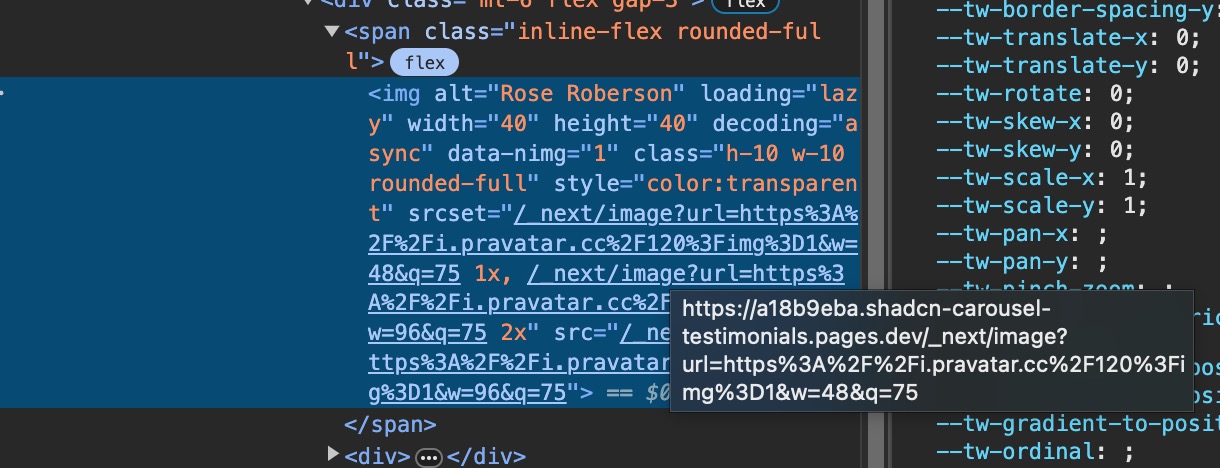
After: [https://shadcn-carousel-testimonials.pages.dev/](https://shadcn-carousel-testimonials.pages.dev/)
---
### Johan Guse Hellow World
**URL:** https://johanguse.dev/blog/hellow-world/
[Skip to main content](https://johanguse.dev/blog/hellow-world/#main-content)
Author
- NameJohan GuseTwitter[@johanguse](https://twitter.com/johanguse)
## Support
Using the template? Support this effort by giving a star on Github, sharing your own blog and giving a shoutout on Twitter or be a project [sponsor](https://github.com/sponsors/timlrx).
## Licence
[MIT](https://github.com/timlrx/tailwind-nextjs-starter-blog/blob/master/LICENSE) © [Timothy Lin](https://www.timrlx.com/)
---
### React useState Multiple Values
**URL:** https://johanguse.dev/blog/react-usestate-store-multiple-values/
[Skip to main content](https://johanguse.dev/blog/react-usestate-store-multiple-values/#main-content)
Author
- NameJohan GuseTwitter[@johanguse](https://twitter.com/johanguse)
Alright, check this out: today, I’m digging into some funky code just to get a button icon spinning when it’s loading. Got two buttons on my page, and the last developer went all out and made two separate useState functions just to toss a loading spinner on each one. Talk about going overboard! But hey, let me walk you through the previous code version:
```
const [isGithubLoading, setisGithubLoading] = useState(false)
const [isGoogleLoading, setIsGoogleLoading] = useState(false)
```
Is this weird? Setting up two states like this totally goes against “Don’t Repeat Yourself” [DRY](https://en.wikipedia.org/wiki/Don%27t_repeat_yourself) vibe. Instead, I’m thinking I’ll just reuse the same setState and stick to one hook. Much cleaner, right?
```
// Define the types for the loading states
interface LoadingState {
google: boolean;
github: boolean;
}
// Initialize the default values for loading states
const initialLoadingValues: LoadingState = {
google: false,
github: false,
};
// Create a custom hook to handle loading state
function useLoading(initialState: LoadingState) {
const [isLoading, setIsLoading] = useState(initialState);
// Generic function to handle the loading state for each provider
// The setTimeout is just for testing purposes.
function handleLoading(provider: keyof LoadingState) {
// Enable the spinner
setIsLoading({
...isLoading,
[provider]: true,
});
// Disable the spinner after 1 second (for testing purposes)
setTimeout(() => {
setIsLoading(prevState => ({
...prevState,
[provider]: false,
}));
}, 1000);
}
return { isLoading, handleLoading };
}
// Your functional component that uses the hook
export default function LoadingButtons() {
const { isLoading, handleLoading } = useLoading(initialLoadingValues);
return (
<>
);
};
```
Or you could go even simpler and skip the custom Hook:
```
const initialLoadingValues = {
google: false,
github: false,
}
const [isLoading, setIsLoading] = useState(initialLoadingValues)
function handle(provider: 'google' | 'github') {
// Enable the spinner
setIsLoading({
...initialLoadingValues,
[provider]: true,
})
// Disable the spinner after 1 second (for testing purposes)
setTimeout(() => {
setIsLoading({
...initialLoadingValues,
[provider]: false,
})
}, 1000)
}
// Using the handle function
```
If you’ve made it this far, I bet you’re eager to see the code in action, huh? Well, no worries! Open the [live demo: useState with multiple values](https://bit.ly/usestate-storing-multiple-values).
So, there you have it! Navigating through this code jungle was a trip, but we made it. We learned how to streamline our code by ditching unnecessary repetition, sticking to the DRY principle, and finding the simplest solution possible. Remember, coding doesn’t always have to be complicated. Sometimes, the most straightforward approach is the best one. Keep exploring, keep coding, and until next time!
---
### 4.1.1 Parsing Removed
**URL:** https://johanguse.dev/blog/success-criteria-4-1-1-parsing-is-no-longer-necessary/
[Skip to main content](https://johanguse.dev/blog/success-criteria-4-1-1-parsing-is-no-longer-necessary/#main-content)
Author
- NameJohan GuseTwitter[@johanguse](https://twitter.com/johanguse)

Photo by [Florian Olivo](https://unsplash.com/@florianolv?utm_source=unsplash&utm_medium=referral&utm_content=creditCopyText) on [Unsplash](https://unsplash.com/photos/4hbJ-eymZ1o?utm_source=unsplash&utm_medium=referral&utm_content=creditCopyText)
## WCAG 2.2 Release Date
The release date for WCAG 2.2 has been changed. The World Wide Web Consortium (W3C) will now release the latest version of the Web Content Accessibility Guidelines (WCAG), version 2.2, in **July, August, or September 2023 (Q3)**. This publication will be an important milestone in the ongoing effort to improve web accessibility and ensure that digital technology is inclusive and accessible to everyone. Please note that the original release date mentioned in this post, April 2023, is no longer accurate.
## What is 4.1.1 Parsing?
WCAG Success Criteria 4.1.1 Parsing is a guideline that requires web content to be written in a way that web browsers and other user agents can understand. This means the code must be written in a way easily parsed and understood by the browser. This includes using valid HTML and CSS, as well as ensuring that the code is properly structured and formatted.
Success Criteria 4.1.1 Parsing had a number of benefits for web accessibility. By ensuring that web content was structured in a way that was easily understood and interpreted by assistive technologies, this criterion helped to ensure that users with disabilities were able to access and use web content effectively. This could include users with visual, auditory, or cognitive impairments, as well as users who rely on assistive technologies, such as screen readers, to navigate and interact with web content. By making web content more accessible to these users, Success Criteria 4.1.1 Parsing helped to increase the inclusiveness and accessibility of the web, which is a critical goal of web accessibility initiatives.
You can read more about Success Criteria 4.1.1 Parsing in the official WCAG documentation at [https://www.w3.org/WAI/WCAG22/Understanding/parsing.html](https://www.w3.org/WAI/WCAG22/Understanding/parsing.html)
## The Removal of 4.1.1 Parsing
One of the most noteworthy changes in WCAG 2.2 is the removal of Success Criteria 4.1.1 Parsing. This change reflects the evolution of web accessibility and the advances in technology and accessibility standards. Originally adopted to address issues with assistive technology directly parsing HTML, this criterion was designed to ensure that web content was structured in a way that was easily understood and interpreted by these technologies. However, as the need for direct parsing has diminished, and the accessibility errors failed by this criterion are now covered by other criteria, it was determined that Success Criteria 4.1.1 Parsing no longer had any utility and was removed from WCAG 2.2.
Read the Call For Consensus (CFC) post on the removal of Success Criteria 4.1.1 Parsing at [https://lists.w3.org/Archives/Public/w3c-wai-gl/2023JanMar/0097.html](https://lists.w3.org/Archives/Public/w3c-wai-gl/2023JanMar/0097.html)
## The WCAG 2.2 Changelog
In addition to the removal of 4.1.1 Parsing, WCAG 2.2 will bring several other changes and improvements to the guidelines for web accessibility. To see a full list of these changes, please refer to the official change log at [https://www.w3.org/TR/WCAG22/#change-log](https://www.w3.org/TR/WCAG22/#change-log). This resource is a must-read for web developers, designers, and content creators who want to stay up-to-date on the latest advances in web accessibility and ensure their web content is accessible to all users.
For further information on the removal of 4.1.1 Parsing, you can refer to the Call For Consensus (CFC) post at [https://lists.w3.org/Archives/Public/w3c-wai-gl/2023JanMar/0097.html](https://lists.w3.org/Archives/Public/w3c-wai-gl/2023JanMar/0097.html).
In conclusion, WCAG 2.2 is set to be a game-changer in the world of web accessibility. With the removal of 4.1.1 Parsing and several other changes, it will provide a more comprehensive and user-friendly approach to web accessibility. Stay tuned for the official release in April 2023.
---
### Turborepo Migration Guide
**URL:** https://johanguse.dev/blog/turborepo-migration/
[Skip to main content](https://johanguse.dev/blog/turborepo-migration/#main-content)
Author
- NameJohan GuseTwitter[@johanguse](https://twitter.com/johanguse)
- Less file to build, better to navigate on the project.
- Separate the the stuffs and focus on one thing at time,
- Make CD/CI more faster
What is Turborepo?
Turborepo is a high-performance build system for JavaScript and TypeScript codebases. Vercel recently [rewrote Turborepo from Go to Rust](https://vercel.com/blog/turborepo-migration-go-rust)—worth reading for context on performance and architecture.
---
### Johan Guse Projects
**URL:** https://johanguse.dev/projects/
[Skip to main content](https://johanguse.dev/projects/#main-content)
# Projects
Check out my latest works!
[](https://johanguse.dev/projects/rural-dispatch/)
## [Rural Dispatch](https://johanguse.dev/projects/rural-dispatch/)
Date: December 2025 - Present
Skills: React 18, TypeScript, Vite, Fastify, Node.js, PostgreSQL, Prisma, Twilio, Vonage, Tailwind CSS, shadcn/ui, Zod
[Client: SWARM NYC](https://swarmnyc.com/)
[Learn more about Rural Dispatch →](https://johanguse.dev/projects/rural-dispatch/)
[](https://johanguse.dev/projects/bank-statement-converter/)
## [Bank Statement Converter](https://johanguse.dev/projects/bank-statement-converter/)
Date: July 2025 - Present
Skills: Next.js 15, React 19, TypeScript, FastAPI, Python, OCR, Cloudflare R2, PostgreSQL, Prisma, Stripe
[Client: Personal Project](https://bankstatementconverterwithai.com/?utm_source=johan-github-readme)
[Learn more about Bank Statement Converter →](https://johanguse.dev/projects/bank-statement-converter/)
[](https://johanguse.dev/projects/llm-generator/)
## [LLM Generator](https://johanguse.dev/projects/llm-generator/)
Date: June 2025 - Present
Skills: React 19, TypeScript, Vite, Hono, Cloudflare Workers, D1, Drizzle ORM, Firecrawl, OpenAI, Trigger.dev, Better Auth
[Client: Personal Project](https://llmgenerator.com/?utm_source=johan-github-readme)
[Learn more about LLM Generator →](https://johanguse.dev/projects/llm-generator/)
[](https://johanguse.dev/projects/datatalked/)
## [DataTalked](https://johanguse.dev/projects/datatalked/)
Date: September 2025 - Present
Skills: React 19, TypeScript, TanStack Router, Convex, Clerk, Stripe Webhooks, OpenAI, Anthropic, RAG, Resend, Recharts, ShadcnUI
[Client: Personal Project](https://datatalked.com/?utm_source=johan-github-readme)
[Learn more about DataTalked →](https://johanguse.dev/projects/datatalked/)
[](https://johanguse.dev/projects/vixtape/)
## [Vixtape](https://johanguse.dev/projects/vixtape/)
Date: August 2024
Skills: Framer, No-code, Interactive Prototyping, UX/UI Design, MVP Development
[Client: SWARM NYC](https://swarmnyc.com/)
[Learn more about Vixtape →](https://johanguse.dev/projects/vixtape/)
[](https://github.com/johanguse/hanko_hackathon)
## [Hanko Hackathon](https://github.com/johanguse/hanko_hackathon)
Date: November 2023
Skills: Next.js, TypeScript, Passkey, Multilingual, PostgreSQL, Supabase
[Client: Hanko Hackathon](https://github.com/johanguse/hanko_hackathon)
[Visit Hanko Hackathon (opens in a new tab) →](https://github.com/johanguse/hanko_hackathon)
[](https://linktr.ee/JoinRiderApp)
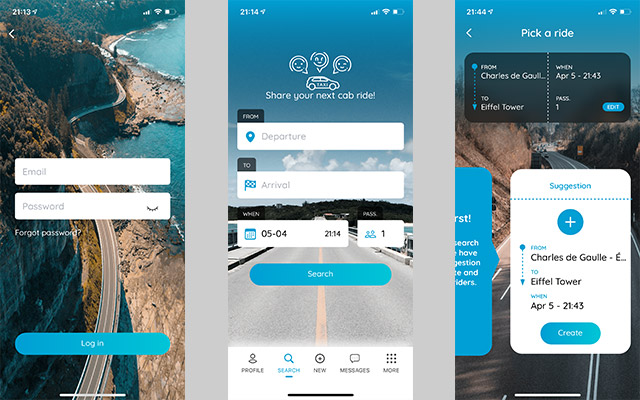
## [JoinRider](https://linktr.ee/JoinRiderApp)
Date: June 2020 - February 2021
Skills: React Native, TypeScript, Storybook
[Client: Joyjet Digital (fr)](https://www.joyjet.com/)
[Visit JoinRider (opens in a new tab) →](https://linktr.ee/JoinRiderApp)
[](https://shikilia.com/)
## [Shikilia](https://shikilia.com/)
Date: May 2021
Skills: WordPress, PHP, CSS, HTML, JavaScript
[Client: Joyjet Digital (fr)](https://www.joyjet.com/)
[Visit Shikilia (opens in a new tab) →](https://shikilia.com/)
[](https://www.getcride.com/)
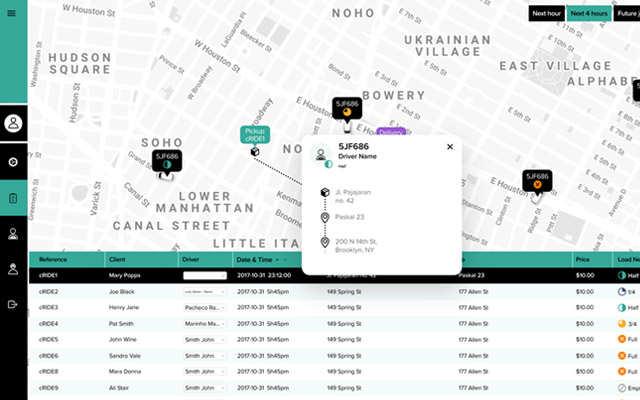
## [cRide Web Admin](https://www.getcride.com/)
Date: February 2021
Skills: React, TypeScript, Storybook
[Client: Joyjet Digital (fr)](https://www.joyjet.com/)
[Visit cRide Web Admin (opens in a new tab) →](https://www.getcride.com/)
[](https://ambevtech.com.br/)
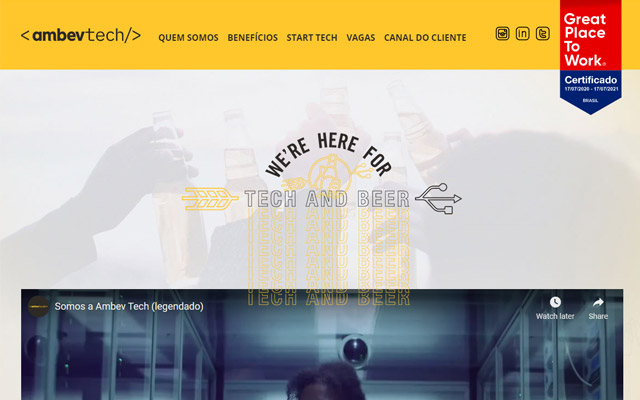
## [AmbevTech (formerly HBSIS)](https://ambevtech.com.br/)
Date: November 2020
Skills: WordPress, PHP, CSS, HTML, JavaScript
[Client: AmbevTech / HBSIS](https://ambevtech.com.br/)
[Visit AmbevTech (formerly HBSIS) (opens in a new tab) →](https://ambevtech.com.br/)

## HBSIS (Now AmbevTech)
Date: May 2019
Skills: WordPress, PHP, CSS, HTML, JavaScript
[Client: AmbevTech / HBSIS](https://ambevtech.com.br/)
[](https://protema.com.br/)
## [Protema](https://protema.com.br/)
Date: April 2019
Skills: WordPress, PHP, CSS, HTML, JavaScript
[Client: Envolve Labs](https://envolvelabs.com/)
[Visit Protema (opens in a new tab) →](https://protema.com.br/)
[](https://maquira.com.br/)
## [Maquira](https://maquira.com.br/)
Date: August 2018
Skills: WordPress, PHP, CSS, HTML, JavaScript
[Client: Design Inverso](https://designinverso.com.br/)
[Visit Maquira (opens in a new tab) →](https://maquira.com.br/)

## Escola Portal Kids
Date: December 2017
Skills: WordPress, PHP, CSS, HTML, JavaScript
[Client: Portal School](https://portalschool.com.br/)
[](https://rieper.com.br/)
## [Rieper Seguros](https://rieper.com.br/)
Date: December 2017
Skills: PHP, CSS, HTML, JavaScript, WordPress
[Client: Portal School](https://portalschool.com.br/)
[Visit Rieper Seguros (opens in a new tab) →](https://rieper.com.br/)
[](https://www.monogramadesign.com/)
## [Agência Monograma](https://www.monogramadesign.com/)
Date: January 2016
Skills: PHP, CSS, HTML, JavaScript
[Client: Agência Monograma](https://www.monogramadesign.com/)
[Visit Agência Monograma (opens in a new tab) →](https://www.monogramadesign.com/)
[](https://www.pocaoterapeutica.com.br/)
## [Poção Terapêutica](https://www.pocaoterapeutica.com.br/)
Date: November 2015
Skills: WordPress, PHP, CSS, HTML, JavaScript
[Client: E-Sauce](https://www.esauce.com.br/)
[Visit Poção Terapêutica (opens in a new tab) →](https://www.pocaoterapeutica.com.br/)
[](https://eiti.com.br/)
## [Eiti Gestão de TI](https://eiti.com.br/)
Date: November 2015
Skills: WordPress, PHP, CSS, HTML, JavaScript
[Client: E-Sauce](https://www.esauce.com.br/)
[Visit Eiti Gestão de TI (opens in a new tab) →](https://eiti.com.br/)
[](https://cavalotrucado.com/)
## [Cavalo Trucado](https://cavalotrucado.com/)
Date: September 2015
Skills: PHP, CSS, HTML, JavaScript
[Client: Cavalo Trucado](https://cavalotrucado.com/)
[Visit Cavalo Trucado (opens in a new tab) →](https://cavalotrucado.com/)
---
### AI Bank Statement Converter
**URL:** https://johanguse.dev/projects/bank-statement-converter/
[Skip to main content](https://johanguse.dev/projects/bank-statement-converter/#main-content)
## Project Overview
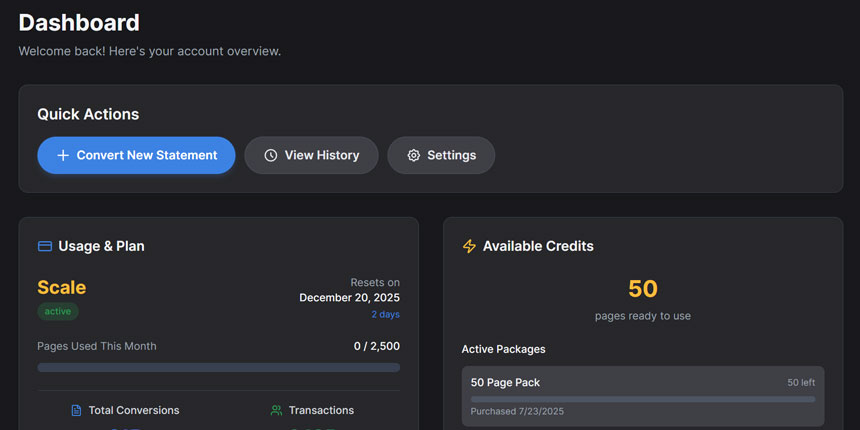
Bank Statement Converter is an AI-powered service that transforms PDF bank statements into Excel, CSV, JSON, and QBO format with OCR. Built on proven Resume-AI architecture, it serves individuals, small businesses, and enterprises who need structured financial data for analysis, accounting, and compliance.
Convert any PDF or Docx bank statement to Excel, CSV, JSON, or QBO in under 30 seconds.
## Key Features
🤖
### AI-Powered OCR
OCR technology
⚡
### Instant Conversion
PDF to Excel/CSV/JSON/QBO in under 30s
🌍
### Bank-Agnostic
Works with 1000+ banks worldwide
📊
### Multiple Formats
Excel, CSV, JSON, and QBO export
🔄
### Batch Processing
Convert up to 5 files simultaneously
🔒
### Secure Storage
Bank-grade encryption with Cloudflare R2
📈
### Usage Dashboard
Track conversion history and limits
💳
### Flexible Pricing
Subscriptions + pay-as-you-go credits
🔌
### API Integration
Developer-friendly endpoints
🏷️
### Auto Categorization
AI-powered spending analysis
## Tech Stack
### Frontend
- Next.js 15.3.4 with App Router
- React 19 with TypeScript
- TailwindCSS & Shadcn/ui
- Aceternity UI for animations
- NextAuth.js for authentication
### Backend Services
- FastAPI-based microservice
- OCR for processing
- Excel, CSV, JSON, QBO generation
- Cloudflare R2 for file storage
- Transaction categorization AI
### Database & Storage
- PostgreSQL with Prisma ORM
- Cloudflare R2 for processed files
- Upstash Redis for rate limiting
### Payments & Deployment
- Stripe for payment processing
- Stripe Customer Portal
- Fly.io for app hosting
- Custom webhook handlers
## Business Model
This SaaS platform serves individuals, small businesses, and enterprises who need structured financial data for analysis, accounting, and compliance. 5 subscription tiers with 20% annual billing discount.
Small Business
Bookkeepers, freelancers
Financial Pros
Accounting firms, advisors
Enterprise
Banks, insurance, legal
[Visit Website →](https://bankstatementconverterwithai.com/?utm_source=johan-website-projects) [← All Projects](https://johanguse.dev/projects/)
---
### DataTalked BI Platform
**URL:** https://johanguse.dev/projects/datatalked/
[Skip to main content](https://johanguse.dev/projects/datatalked/#main-content)
## Project Overview
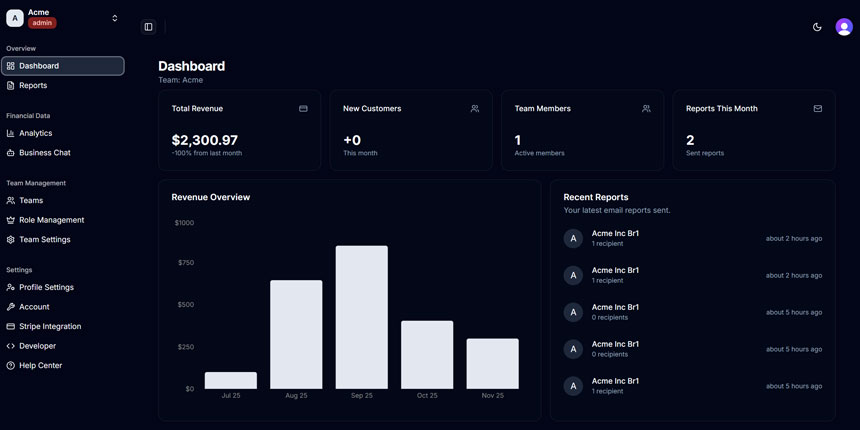
DataTalked is a production-ready business intelligence SaaS platform that started as a Shadcn admin dashboard template and evolved into a comprehensive financial analytics solution. Built for the [Convex + Resend Hackathon](https://www.convex.dev/hackathons/resend), it combines automated Stripe data synchronization with AI-powered conversational analytics and automated email reporting.
## Key Features
### RAG-Based AI Chat System
- **Multi-Agent Architecture:** Manager, Retriever, and Analyst agents working together
- **Natural Language Queries:** Ask "What's our MRR?" or "Show me revenue trends"
- **7 Structured Business Tools:** MRR, revenue, customers, churn, LTV, CAC metrics
- **Vector Search:** OpenAI embeddings for document retrieval with reranking
- **Provenance Tracking:** Every answer includes source metadata and confidence scores
### Automated Stripe Synchronization
- **3-Tier Sync:** Hourly cron job, real-time webhooks, manual refresh
- **Comprehensive Data:** Payments, customers, subscriptions, disputes, refunds
- **Background Processing:** All data cached in Convex for fast queries
- **Webhook Security:** Signature verification and event ID logging
### Real-time Analytics Dashboard
- **Financial Metrics:** Revenue, MRR, churn rate, LTV, CAC with growth indicators
- **Interactive Charts:** Revenue trends, customer acquisition, product performance
- **Demo Data Mode:** 580+ days of realistic financial data for testing
### Automated Email Reports
- **Flexible Scheduling:** Daily, weekly, monthly, quarterly reports
- **Beautiful Templates:** React Email components with comprehensive metrics
- **Smart Scheduling:** 30-minute precision with timezone support
- **Delivery Tracking:** Email history with open rate monitoring via Resend
## Tech Stack
### Frontend
- React 19 with TypeScript (strict mode)
- TanStack Router (file-based routing)
- ShadcnUI (TailwindCSS v4 + RadixUI)
- Recharts for data visualization
- Vite for fast development builds
### Backend & Database
- Convex (real-time serverless database)
- Convex Actions for external API calls
- Convex Crons for scheduled tasks
- HTTP endpoints for webhooks
- Stripe API integration
### AI & Integrations
- OpenAI GPT-4 (chat and embeddings)
- Anthropic Claude (alternative model)
- Convex AI Agent framework
- Convex RAG package for vector search
- Resend for email delivery
### Development
- Bun for package management
- ESLint & Prettier for code quality
- GitHub Actions for CI/CD
- Netlify for frontend hosting
- Convex Cloud for backend
## Technical Highlights
### AI Chat Architecture
The chat system uses a multi-agent approach where the Manager Agent analyzes query complexity, the Retriever Agent searches relevant documents using RAG, and the Analyst Agent executes structured business metric tools. All responses include provenance tracking with source citations and confidence scores.
### Stripe Sync Strategy
Instead of making live API calls, DataTalked implements a three-tier synchronization system: hourly background cron jobs fetch all data, real-time webhooks handle instant updates, and users can manually refresh when needed.
### Demo Data System
The platform includes a comprehensive demo mode with 580+ days of realistic financial data (Jan 2024 - Aug 2025) generated using Faker.js. This enables users to explore features without connecting their Stripe account.
[Visit Website →](https://datatalked.com/?utm_source=johan-website-projects) [← All Projects](https://johanguse.dev/projects/)
---
### Rural Dispatch Project
**URL:** https://johanguse.dev/projects/rural-dispatch/
[Skip to main content](https://johanguse.dev/projects/rural-dispatch/#main-content)
## Project Overview
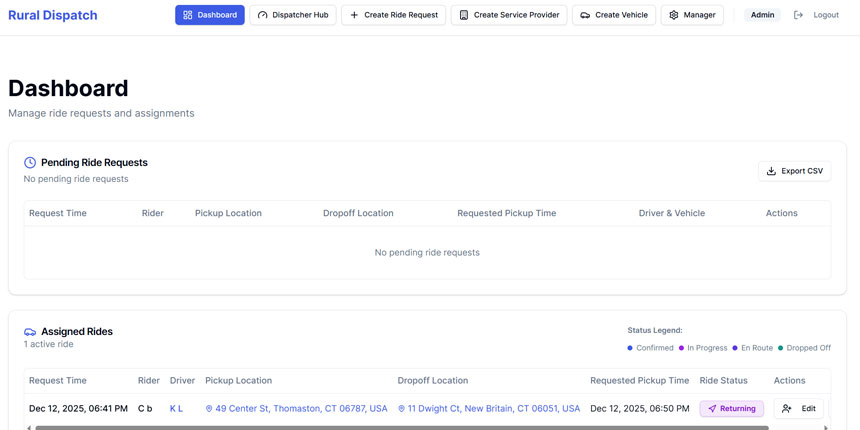
Rural Dispatch is a comprehensive ride-sharing management application built to serve rural communities where traditional ride-sharing services are unavailable. The platform enables dispatchers, case managers, and drivers to coordinate transportation for service users, featuring real-time SMS notifications and TCPA-compliant messaging.
## Key Features
### Role-Based Access Control
- **Admin:** Full system access including user management and system configuration
- **Dispatcher:** Coordinate rides, assign drivers, manage daily operations
- **Case Manager:** Request rides on behalf of clients and riders
- **Driver:** View assigned rides, update ride status, receive notifications
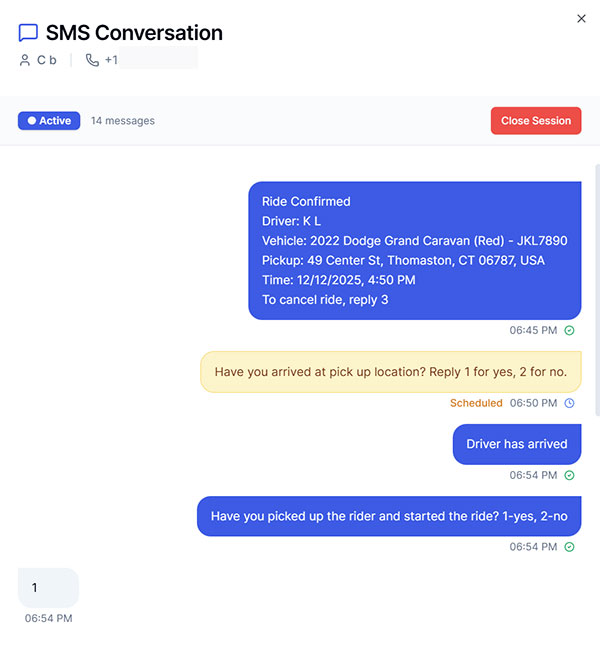
### Two-Way SMS Notifications
- **Dual Provider Support:** Twilio (primary) and Vonage (fallback) for reliability
- **Real-time Updates:** Automated notifications for ride confirmations, driver assignments, and ETAs
- **TCPA Compliance:** Built-in consent management and opt-out handling
- **Conversation Tracking:** Full SMS history and conversation threading
### Ride Management System
- **Request Creation:** Easy-to-use forms for scheduling rides with pickup/dropoff details
- **Driver Assignment:** Match available drivers and vehicles to ride requests
- **Status Tracking:** Real-time ride status updates from request to completion
- **Fleet Management:** Track vehicles, driver availability, and scheduling
## Tech Stack
### Frontend
- React 18 with TypeScript (strict mode)
- Vite for fast development and builds
- Tailwind CSS + shadcn/ui components
- React Hook Form with Zod validation
- React Router v6 for navigation
### Backend
- Node.js with Fastify framework
- PostgreSQL database
- Prisma ORM v7
- ESM modules
- bcryptjs for authentication
### SMS & Notifications
- Twilio (primary SMS provider)
- Vonage (fallback SMS provider)
- Two-way SMS conversations
- Webhook handlers for incoming messages
### Development
- Bun for package management
- Biome for linting and formatting
- Vitest for testing
- Shared Zod schemas between client/server
## Technical Highlights
### Monorepo Architecture
The project uses a monorepo structure with shared Zod validation schemas between the React frontend and Fastify backend. This ensures type safety and validation consistency across the entire application.
### SMS System Design
The SMS notification system implements a dual-provider approach with Twilio as the primary provider and Vonage as fallback. The system handles two-way conversations, tracks message history, and implements TCPA-compliant opt-out handling.
### Role-Based Security
Authentication uses bcryptjs for password hashing with role-based middleware that enforces access control at both the route and component level.
[SWARM NYC →](https://swarmnyc.com/) [GitHub →](https://github.com/swarmnyc/ruraldispatch-ride-request) [← All Projects](https://johanguse.dev/projects/)
---
### Vixtape Framer Prototype
**URL:** https://johanguse.dev/projects/vixtape/
[Skip to main content](https://johanguse.dev/projects/vixtape/#main-content)
Cloudinary Video Player Embed v0.6.0

Video Player is loading.
Play Video
Play
Mute
Current Time 0:00
/
Duration 0:50
Loaded: 73.90%
0:00
Stream Type LIVE
Seek to live, currently behind liveLIVE
Remaining Time -0:50
1x
Playback Rate
Sources
Descriptions
- descriptions off, selected
Captions
- captions off, selected
Audio Track
Fullscreen [Logo link](https://cloudinary.com/)
This is a modal window.
## Project Overview
Vixtape is an interactive MVP demo created for SWARM NYC to showcase an innovative content streaming platform concept. Built entirely in Framer as a no-code prototype, this demo was designed for investor presentations to communicate the product vision and user experience.
The concept features an experience where viewers watch content on a TV display (16:9 ratio). Content attribution is maintained through QR codes that display metadata about audio and video creators. This demo focuses on visualizing the user flow and interaction patterns rather than implementing production-ready features.
**Note:** This is a conceptual MVP demo built in Framer for presentation purposes. It demonstrates the UX/UI vision and interaction design but does not include backend functionality or production features.
## Tech Stack
### Design & Prototyping
- Framer (No-code prototyping platform)
- Interactive wireframes and mockups
- Animations and micro-interactions
- Click-through prototype flows
### Demo Capabilities
- TV display optimization (16:9 aspect ratio)
- Device concept visualization
- Interactive navigation flows
- Presentation-ready animations
[SWARM NYC →](https://swarmnyc.com/) [← All Projects](https://johanguse.dev/projects/)
---
### LLMGenerator Project Overview
**URL:** https://johanguse.dev/projects/llm-generator/
[Skip to main content](https://johanguse.dev/projects/llm-generator/#main-content)
## Project Overview
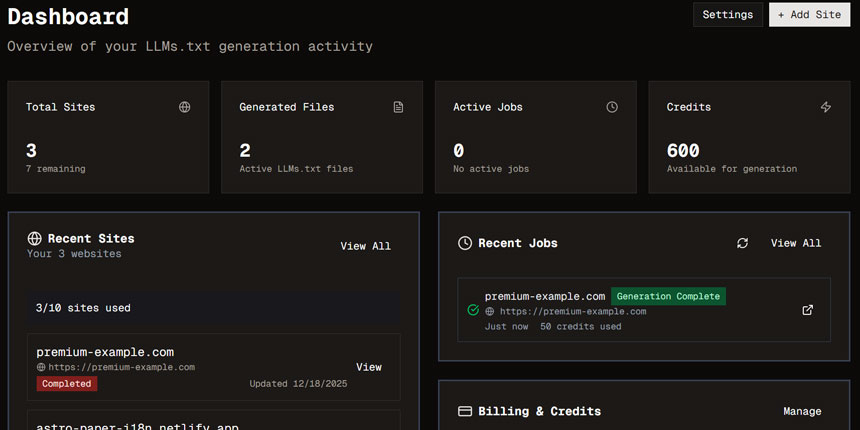
LLMGenerator is a service that generates `llms.txt` files for websites to improve their visibility to large language models. The service uses Firecrawl's map + scrape approach with OpenAI enhancement to create high-quality, LLM-optimized content.
## What is llms.txt?
llms.txt is a standardized format for making website content more accessible to Large Language Models (LLMs):
- **llms.txt:** A concise index of all pages with AI-enhanced titles and descriptions
- **llms-full.txt:** Complete content of all pages for comprehensive access
## Key Features
🚀
### Fast Generation
Direct map + scrape with background processing
⚡
### Reliable Jobs
Trigger.dev integration with automatic retries
🤖
### AI-Enhanced
OpenAI-powered titles and descriptions
💰
### Cost-Optimized
95% cheaper than competitors
📊
### Analytics
Track generation stats and usage
🔄
### Real-time Updates
Live progress tracking
📖
### API Docs
OpenAPI/Swagger 3.0 interactive docs
🔒
### Flexible Pricing
Credits (never expire) + subscriptions
## Generation Methods
### Simple Generation (1x Credits)
- Fast generation (15-30 seconds)
- Uses Firecrawl's /llmstxt endpoint
- Cost-effective for free tier users
- Locked for free plans, optional for paid
### Enhanced Generation (2x Credits)
- AI-enhanced titles and descriptions
- Uses map + scrape + OpenAI integration
- Premium quality for paid plans
- Default for paid users
## Tech Stack
### Frontend
- React 19 with TypeScript
- Vite for fast builds
- Tanstack Router & Query
- Tailwind CSS & shadcn/ui
- React Hook Form with Zod
### Backend
- Hono on Cloudflare Workers
- Cloudflare D1 (SQLite) with Drizzle ORM
- Better Auth for authentication
- Trigger.dev for background jobs
- tRPC for type-safe APIs
### Integrations
- Firecrawl API for web scraping
- OpenAI API for content enhancement
- Stripe for payments
- Cloudflare KV for session caching
- Sentry for error tracking
### Development
- Biome for linting/formatting
- Bun for package management
- Wrangler for deployments
- Vitest with 135 tests
- OpenAPI/Swagger documentation
[Visit Website →](https://llmgenerator.com/?utm_source=johan-website-projects) [← All Projects](https://johanguse.dev/projects/)
---
### Analytics Tag Archive
**URL:** https://johanguse.dev/tags/analytics/
[Skip to main content](https://johanguse.dev/tags/analytics/#main-content)
# analytics
- Published on
December 27, 2025
## [Google Search Console Regex Filtering: Find AI-Generated Queries](https://johanguse.dev/blog/google-search-console-regex-filtering/)
[seo](https://johanguse.dev/tags/seo/) [google](https://johanguse.dev/tags/google/) [analytics](https://johanguse.dev/tags/analytics/)
Learn how to use regex patterns in Google Search Console to identify queries that likely came from AI tools like ChatGPT, Perplexity, or Google AI Overviews.
---
### A11y Tag Archive
**URL:** https://johanguse.dev/tags/a11y/
[Skip to main content](https://johanguse.dev/tags/a11y/#main-content)
# a11y
- Published on
February 4, 2023
## [WCAG 2.2 - Success Criteria 4.1.1 Parsing is No Longer Necessary (Obsolete)](https://johanguse.dev/blog/success-criteria-4-1-1-parsing-is-no-longer-necessary/)
[a11y](https://johanguse.dev/tags/a11y/) [news](https://johanguse.dev/tags/news/)
WCAG 2.2, the latest version of the Web Content Accessibility Guidelines, is set to be completed and published in April 2023. The new version of the guidelines will bring changes and improvements to the standards for web accessibility, including the removal of Success Criteria 4.1.1 Parsing.
---
### Cloudflare Tag Page
**URL:** https://johanguse.dev/tags/cloudflare/
[Skip to main content](https://johanguse.dev/tags/cloudflare/#main-content)
# Cloudflare
- Published on
January 1, 2024
## [Using External Images on Cloudflare Workers & Pages with Next.js](https://johanguse.dev/blog/how-to-use-external-images-on-cloudflare-with-nextjs/)
[Next.js](https://johanguse.dev/tags/next.js/) [Cloudflare](https://johanguse.dev/tags/cloudflare/)
Working with external images on Cloudflare Workers & Pages using a custo loader from NextJS
---
### CSS Tag Archive
**URL:** https://johanguse.dev/tags/css/
[Skip to main content](https://johanguse.dev/tags/css/#main-content)
# css
- Published on
March 1, 2025
## [CSS nesting: What is it and how to use it?](https://johanguse.dev/blog/css-nesting/)
[css](https://johanguse.dev/tags/css/) [frontend](https://johanguse.dev/tags/frontend/)
CSS nesting is a new feature that allows you to nest one style rule inside another (like SASS), with the selector of the child rule relative to the selector of the parent rule.
---
### Frontend Tag Posts
**URL:** https://johanguse.dev/tags/frontend/
[Skip to main content](https://johanguse.dev/tags/frontend/#main-content)
# frontend
- Published on
March 1, 2025
## [CSS nesting: What is it and how to use it?](https://johanguse.dev/blog/css-nesting/)
[css](https://johanguse.dev/tags/css/) [frontend](https://johanguse.dev/tags/frontend/)
CSS nesting is a new feature that allows you to nest one style rule inside another (like SASS), with the selector of the child rule relative to the selector of the parent rule.
- Published on
April 8, 2024
## [Using React useState to store multiple values](https://johanguse.dev/blog/react-usestate-store-multiple-values/)
[react](https://johanguse.dev/tags/react/) [frontend](https://johanguse.dev/tags/frontend/)
Learn how we can store multiple values in single state using useState hook in functional component.
---
### Google Tag Archive
**URL:** https://johanguse.dev/tags/google/
[Skip to main content](https://johanguse.dev/tags/google/#main-content)
# google
- Published on
December 27, 2025
## [Google Search Console Regex Filtering: Find AI-Generated Queries](https://johanguse.dev/blog/google-search-console-regex-filtering/)
[seo](https://johanguse.dev/tags/seo/) [google](https://johanguse.dev/tags/google/) [analytics](https://johanguse.dev/tags/analytics/)
Learn how to use regex patterns in Google Search Console to identify queries that likely came from AI tools like ChatGPT, Perplexity, or Google AI Overviews.
---
### Hackathon Tag Archive
**URL:** https://johanguse.dev/tags/hackathon/
[Skip to main content](https://johanguse.dev/tags/hackathon/#main-content)
# hackathon
- Published on
October 27, 2023
## [Hanko Hackathon 2023](https://johanguse.dev/blog/hanko-auth-hackathon/)
[hackathon](https://johanguse.dev/tags/hackathon/)
Unpacking NextJS 14, playing with cool authentication, and making setup a breeze! Hanko Hackathon 2023
---
### MacOS Finder Guides
**URL:** https://johanguse.dev/tags/guide/
[Skip to main content](https://johanguse.dev/tags/guide/#main-content)
# guide
- Published on
May 5, 2022
## [How do you add options to the Right Click Context Menu on MacOS Finder](https://johanguse.dev/blog/create-custom-right-click-context-menu-item-in-macos-finder/)
[macos](https://johanguse.dev/tags/macos/) [guide](https://johanguse.dev/tags/guide/)
Add context menu to macOS Finder (like Windows OS)
---
### IDE Tag Page
**URL:** https://johanguse.dev/tags/ide/
[Skip to main content](https://johanguse.dev/tags/ide/#main-content)
# ide
- Published on
May 27, 2024
## [How to downgrade VSCode extension](https://johanguse.dev/blog/downgrading-vscode-extension/)
[ide](https://johanguse.dev/tags/ide/) [tutorial](https://johanguse.dev/tags/tutorial/)
Learn how to downgrade a VSCode extension to an older version easily. This guide provides two methods to revert to a previous version.
---
### macOS Context Menu Guide
**URL:** https://johanguse.dev/tags/macos/
[Skip to main content](https://johanguse.dev/tags/macos/#main-content)
# macos
- Published on
May 5, 2022
## [How do you add options to the Right Click Context Menu on MacOS Finder](https://johanguse.dev/blog/create-custom-right-click-context-menu-item-in-macos-finder/)
[macos](https://johanguse.dev/tags/macos/) [guide](https://johanguse.dev/tags/guide/)
Add context menu to macOS Finder (like Windows OS)
---
### Accessibility News Archive
**URL:** https://johanguse.dev/tags/news/
[Skip to main content](https://johanguse.dev/tags/news/#main-content)
# news
- Published on
February 4, 2023
## [WCAG 2.2 - Success Criteria 4.1.1 Parsing is No Longer Necessary (Obsolete)](https://johanguse.dev/blog/success-criteria-4-1-1-parsing-is-no-longer-necessary/)
[a11y](https://johanguse.dev/tags/a11y/) [news](https://johanguse.dev/tags/news/)
WCAG 2.2, the latest version of the Web Content Accessibility Guidelines, is set to be completed and published in April 2023. The new version of the guidelines will bring changes and improvements to the standards for web accessibility, including the removal of Success Criteria 4.1.1 Parsing.
---
### Next.js Tag Posts
**URL:** https://johanguse.dev/tags/next.js/
[Skip to main content](https://johanguse.dev/tags/next.js/#main-content)
# Next.js
- Published on
January 1, 2024
## [Using External Images on Cloudflare Workers & Pages with Next.js](https://johanguse.dev/blog/how-to-use-external-images-on-cloudflare-with-nextjs/)
[Next.js](https://johanguse.dev/tags/next.js/) [Cloudflare](https://johanguse.dev/tags/cloudflare/)
Working with external images on Cloudflare Workers & Pages using a custo loader from NextJS
---
### React Tag Posts
**URL:** https://johanguse.dev/tags/react/
[Skip to main content](https://johanguse.dev/tags/react/#main-content)
# react
- Published on
April 8, 2024
## [Using React useState to store multiple values](https://johanguse.dev/blog/react-usestate-store-multiple-values/)
[react](https://johanguse.dev/tags/react/) [frontend](https://johanguse.dev/tags/frontend/)
Learn how we can store multiple values in single state using useState hook in functional component.
---
### SEO Tag Archive
**URL:** https://johanguse.dev/tags/seo/
[Skip to main content](https://johanguse.dev/tags/seo/#main-content)
# seo
- Published on
December 27, 2025
## [Google Search Console Regex Filtering: Find AI-Generated Queries](https://johanguse.dev/blog/google-search-console-regex-filtering/)
[seo](https://johanguse.dev/tags/seo/) [google](https://johanguse.dev/tags/google/) [analytics](https://johanguse.dev/tags/analytics/)
Learn how to use regex patterns in Google Search Console to identify queries that likely came from AI tools like ChatGPT, Perplexity, or Google AI Overviews.
---
---
*Last updated: 2026-04-05*
*Source: https://johanguse.dev/*